
Region Settings: choose, check, and change your marketplace region
Learn how to pick the United States or Canada for each marketplace and see which sites and currency DropFlowLister uses.
On this page
Region Settings tell DropFlowLister which country's sites to use. Each marketplace has its own region, so your eBay region and your Poshmark region can be different.
Key points
- Two regions today: 🇺🇸 United States and 🇨🇦 Canada. More eBay regions are in progress.
- Set per marketplace: The eBay region is separate from the Poshmark region.
- Poshmark region sets Amazon too: In Poshmark mode, the region picks both the Amazon site and the Poshmark site.
- eBay region is for eBay only: In eBay mode, the region picks the eBay site you list to. It doesn't change which Amazon site is used.
- Currency follows the region: USD ($) for the US and CAD for Canada.
Before you start
- Finish any running Flow Lister session before you change regions.
- Know which marketplace you're setting: eBay or Poshmark.
How to change your Poshmark region
To change it:
- Click the DropFlowLister icon in the Chrome toolbar.
- Pick Poshmark in the marketplace dropdown.
- Click Poshmark Settings.
- Go to Region Settings.
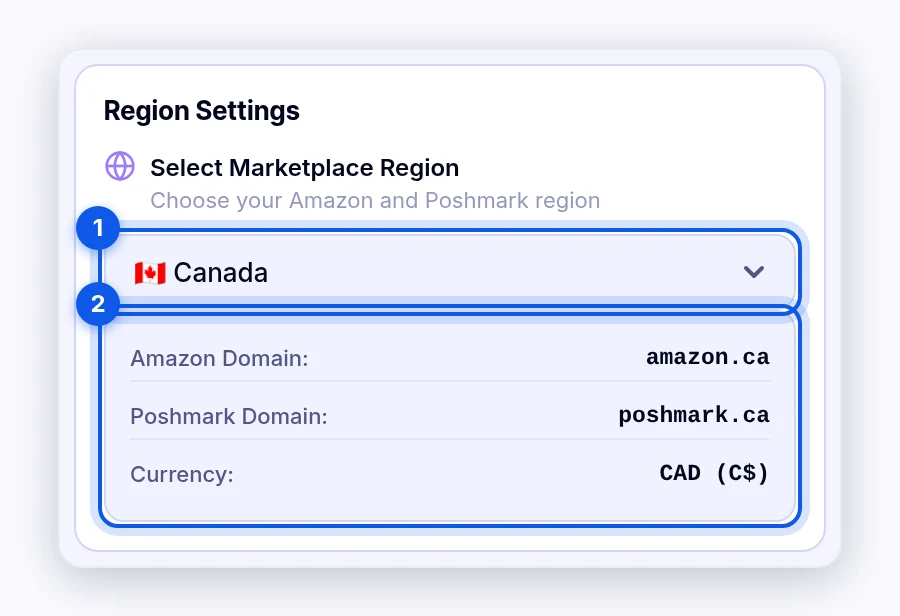
- Pick 🇺🇸 United States or 🇨🇦 Canada in Select Marketplace Region.
The section shows the Amazon Domain, Poshmark Domain, and Currency for that region, for example amazon.ca, poshmark.ca, and CAD.
How to change your eBay region
To change it:
- Pick eBay in the marketplace dropdown.
- Click eBay Settings.
- Go to Region Settings.
- Pick 🇺🇸 United States or 🇨🇦 Canada.
The section shows the eBay Domain and Currency. You'll see a message like "🌍 eBay region changed to …".
Note: The eBay pages in DropFlowLister, such as Flow Lister, Profit Hunter, and Market Analyzer, show a region badge. Hover over it to see a reminder that you change it in the popup.
What the region changes
| Region | Poshmark mode | eBay mode |
|---|---|---|
| 🇺🇸 United States | amazon.com and poshmark.com, USD | ebay.com, USD |
| 🇨🇦 Canada | amazon.ca and poshmark.ca, CAD | ebay.ca, CAD |
Important: Change your region before you paste links. In the Poshmark Flow Lister, amazon.com links go to poshmark.com and amazon.ca links go to poshmark.ca.
Tips and limits
- Match your seller account. Pick the region where your marketplace account is registered.
- Shipping discounts differ by region. In the Poshmark Flow Lister, $4.99 is for poshmark.com, and C$6.99 and C$9.99 are for poshmark.ca.
- Other eBay sites: DropFlowLister supports eBay US and Canada today, and more eBay regions are in progress. Only the US and Canada can be chosen in Region Settings.
Related articles
Still stuck? Chat with us.
See Region Settings: troubleshooting, or email contact@dropflowlister.com.