
Flow Lister for Poshmark: set up, bulk list, and export results
Learn how to paste Amazon links or ASINs, set pricing and shipping, and bulk list products to Poshmark.
On this page
The Poshmark version of Flow Lister bulk lists supplier products to your Poshmark closet. Poshmark is one of the marketplaces DropFlowLister lists to today. You paste Amazon links or ASINs, and Flow Lister optimizes each product with AI and fills in Poshmark's listing form for you. In some places, such as the Amazon button Add to AI Optimizer, this tool is called the "AI Optimizer".
Key points
- Supplier: Amazon only. You can paste full links or bare ASINs (the 10-character Amazon product ID).
- Regions: amazon.com products list to poshmark.com, and amazon.ca products list to poshmark.ca.
- What it fills in: title, description, category, colors, sizes, images, price, condition, SKU, and discounted shipping.
- Sizes: Sizes Amazon doesn't stock are set to quantity 0.
- Credits: Each listing uses 1 credit, including AI optimization.
- Built-in pacing: After 100 successful listings, Flow Lister adds a 2-minute cooldown every 5 listings to lower the chance of supplier blocks.
Before you start
- You're signed in to DropFlowLister with an active plan and credits.
- You're signed in to Poshmark in the same Chrome browser.
- Your region is set in the popup under Poshmark Settings → Region Settings. See Region Settings.
- You have a store and a Poshmark image template. See Stores.
- For AI image enhancement, you have your own Replicate API key. See AI Image Enhancement.
- The eBay Flow Lister is closed. Only one Flow Lister can run at a time.
How to open Flow Lister for Poshmark
To open it:
- Click the DropFlowLister icon in the Chrome toolbar.
- Pick Poshmark in the marketplace dropdown.
- Click the Flow Lister card ("Bulk list products to Poshmark fast").
The Poshmark Flow Lister page opens in a new tab.
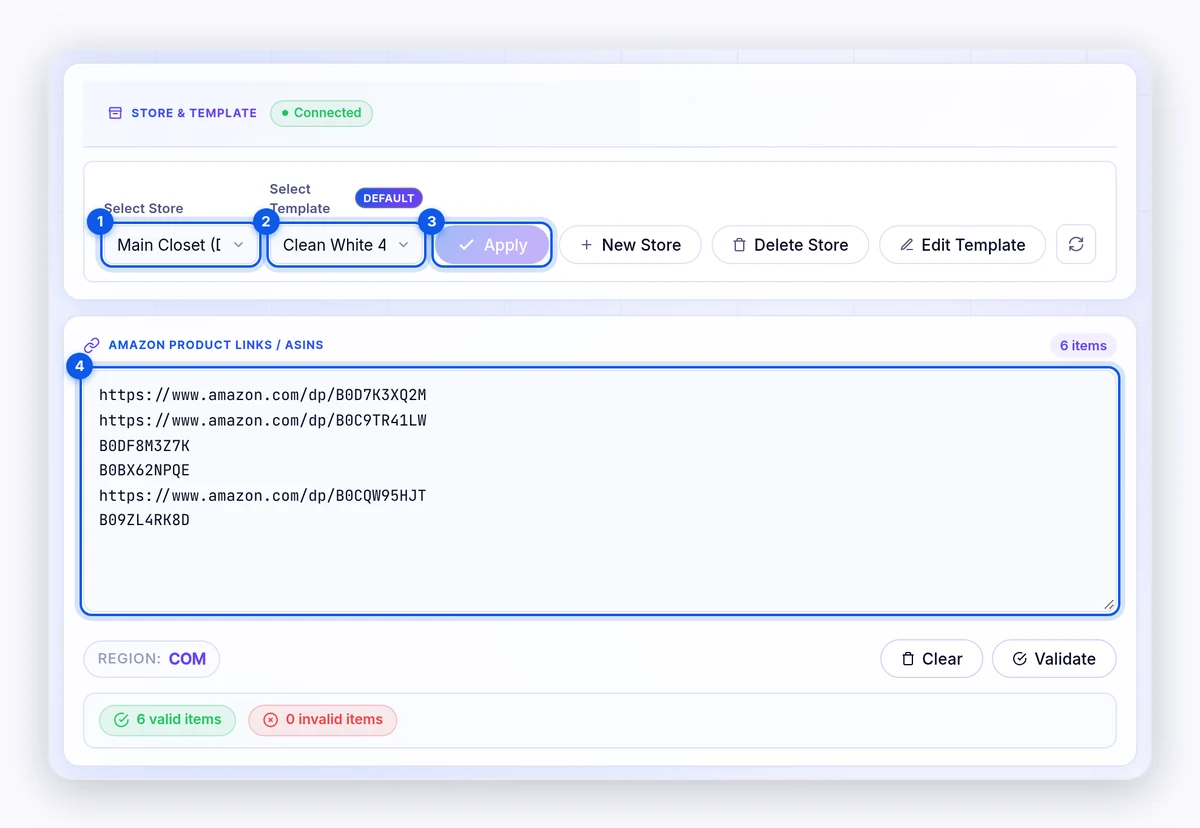
How to choose a store and template
To choose them:
- Pick a store in Select Store. The template list changes to show only that store's templates.
- Pick a template in Select Template.
- Click Preview to see the template, if you like.
- Click Apply.
Important: If you change the store without clicking Apply, Flow Lister warns you with "⚠️ Store Selection Not Applied!" before it starts. Click Apply first so listings go to the right store.
Other buttons: New Store, Delete Store, and Edit Template (opens the Poshmark Template Builder).
How to add and check your products
To add products:
- Paste Amazon links or ASINs into Amazon Product Links / ASINs, one per line.
- Click Validate.
- Check the valid items and invalid items counts.
Examples:
https://www.amazon.com/dp/B09FCT23B3B07D1BS5ZX
When the run starts, products already listed in this store move to Already Listed Products (Excluded) and are skipped.
Tip: You can add products from Amazon pages with the Add to AI Optimizer button, or send ASINs from the ASIN Manager with Import to Dropflow.
How to choose your settings
Threads & Limits
| Setting | Default | What it does |
|---|---|---|
| Parallel Threads | 1 | How many products are processed at once (1, 2, or 3). More threads are faster but use more computer resources. |
| Start From | 1 | The item number to start from in your list. |
| Max Successful | Unlimited | Stops after this many successful listings. Skips don't count. |
Filters & Enhancements
| Setting | Default | What it does |
|---|---|---|
| Variation Filtering | Off | Lists only one variation per product to avoid duplicates. |
| Max Price Diff % | 10 | Variations that cost more than this above the base price are filtered out. |
| Max Delivery Days | 4 | Variations that arrive later than this are filtered out. |
| AI Image Enhancement | Off | Edits images with your Replicate account. Click Configure first. |
| Images | 1 | How many images per product to enhance (1–10). |
| Background (Optional) | None | A background scene for the AI to place your product in. |
| Skip Keywords | Empty | Products whose title has any of these words are skipped. Load Defaults adds the built-in list. |
Pricing & Shipping
| Setting | Default | What it does |
|---|---|---|
| Markup Percentage | 150 | Profit over Amazon cost for this store. 0% = no markup, 100% = double, 200% = triple. |
| Variable Markup by Cost | Off | Markup bands by Amazon cost. A matching band overrides Markup Percentage. Leave the last band's "to" box blank for open-ended. |
| Variable Shipping Discount by Cost | Off | Picks a shipping discount by Amazon cost. $4.99 is for poshmark.com. C$6.99 and C$9.99 are for poshmark.ca. A matching band overrides Offer Free Shipping. |
| Offer Free Shipping | Off | Sets discounted shipping to "Free" on every listing. You pay the shipping cost. |
| Amazon Seller Restriction | Off | Lists only items where Amazon is the shipper and seller. |
AI Prompt Configuration
The Title Prompt and Description Prompt guide the AI for Poshmark listings. Keep the {paste product details…} placeholder. Restore Default undoes your changes. See AI Prompt Configuration.
How to run Flow Lister for Poshmark
To start:
- Click Start Optimization.
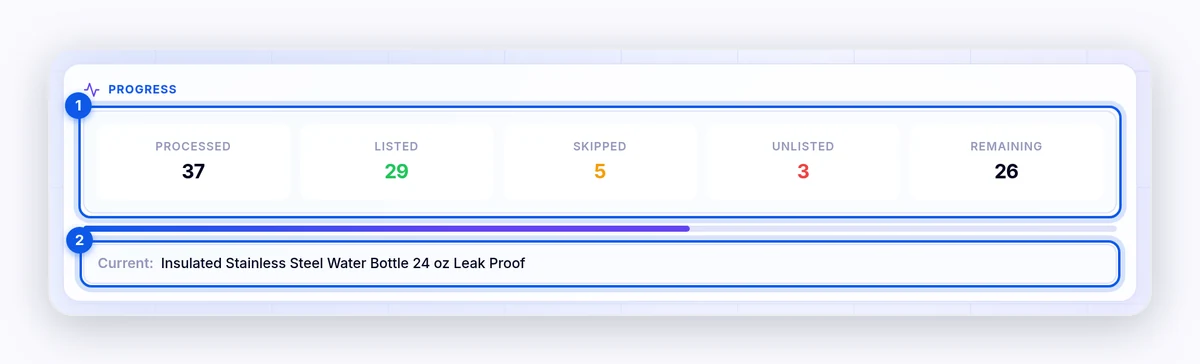
- Watch Progress: Processed, Listed, Skipped, Unlisted, and Remaining.
- Click Pause to pause, and Continue to resume.
- Click Stop to end the run.
Keep the Flow Lister tab open while it runs. The Cooldown timer at the top shows when Flow Lister is waiting.
How to review and export results
- Recent Processed Images shows the images built for recent listings.
- Session Summary shows how many products were listed, skipped by keywords, or unlisted.
- Listing Activity lets you filter by All, Listed, Unlisted, or Skipped.
- The copy button copies every link that isn't listed.
- The export button saves a CSV named
dropflow-listing-activity-YYYY-MM-DD.csv.
Tips and limits
- Poshmark has its own listing limit. If your account reaches it, Flow Lister stops and shows "⚠️ Listing Limit Reached". Poshmark doesn't publish the limit. If you see the message, pause listing for 24 hours.
- Amazon may block heavy use. If Amazon shows a CAPTCHA, Flow Lister pauses, cools down, and tries to resume on its own.
- Shipping discounts must exist on Poshmark. If the shipping option you picked isn't offered for that listing, Flow Lister logs a warning.
- Session data saves automatically, so you can close and reopen the page.
Related articles
Still stuck? Chat with us.
See Flow Lister for Poshmark: troubleshooting, or email contact@dropflowlister.com with a screenshot, the ASIN, and the time.