
Get started: install, sign in, and set up DropFlowLister
Learn how to install the DropFlowLister Chrome extension, find your way around the popup, and set up your first listing.
On this page
DropFlowLister is a Chrome extension that helps you list supplier products on a marketplace. Today it supports eBay and Poshmark as marketplaces, and suppliers like Amazon, AliExpress, and Walmart. It also has research tools to help you find products to sell.
Key points
- Browser: DropFlowLister works in Google Chrome version 116 or newer.
- Account and plan: You need a DropFlowLister account and an active plan or trial.
- Marketplace accounts: You also need your own marketplace and supplier accounts, signed in to in Chrome.
- Setup order: Account → region → store → template → AI prompts → first listing.
Before you start
- Update Chrome: open Chrome menu → Help → About Google Chrome.
- Create a DropFlowLister account. See Account: create, sign in, reset your password, and sign out.
- Sign in to your marketplace account (eBay or Poshmark) in Chrome.
Step 1: Install DropFlowLister
DropFlowLister is on the Chrome Web Store as Dropflow Lister – Dropshipping Toolkit.
- Open the Chrome Web Store in Chrome.
- Search for Dropflow Lister – Dropshipping Toolkit.
- Click Add to Chrome.
- Click Add extension to confirm.
After installing, check it's turned on:
- Go to
chrome://extensions. - Find DropFlowLister.
- Make sure the switch is on.
Step 2: Pin DropFlowLister and open the popup
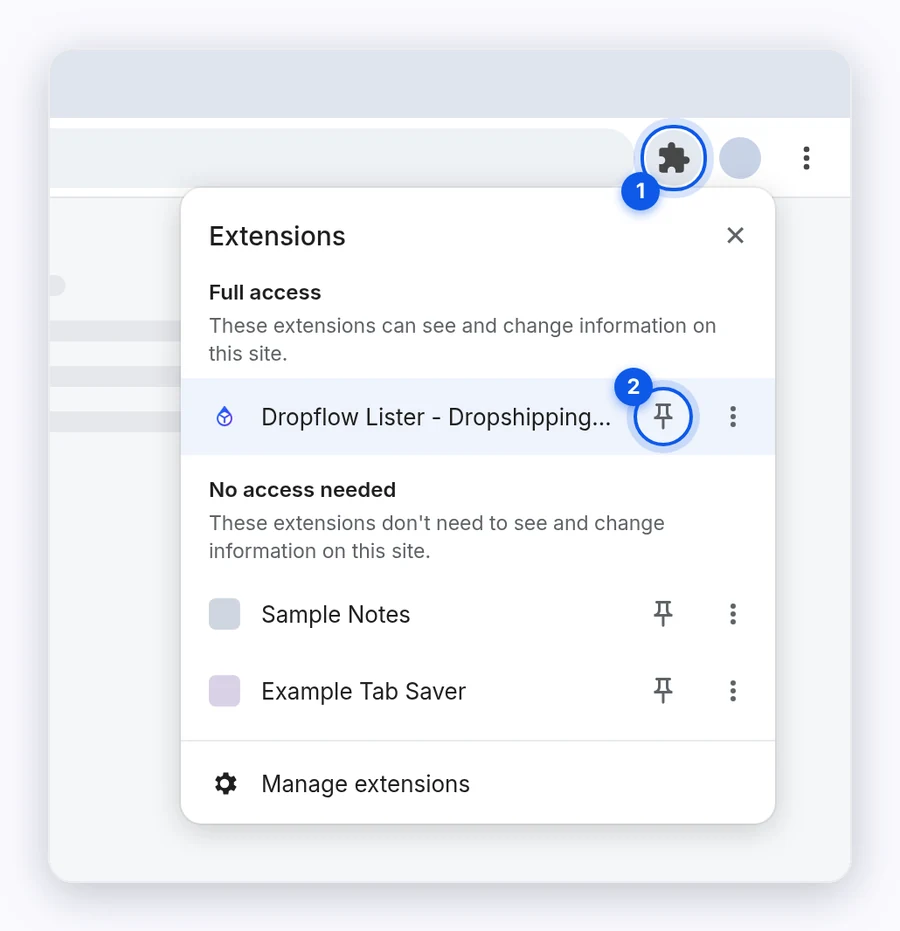
- Click the puzzle-piece icon in the Chrome toolbar.
- Click the pin icon next to DropFlowLister.
- Click the DropFlowLister icon to open the popup.
Step 3: Sign in
- Type your Email and Password in the popup.
- Click Sign In.
- Wait for "Login successful! Loading...".
If the popup shows a lock screen, see Billing and access errors.
Step 4: Get to know the popup
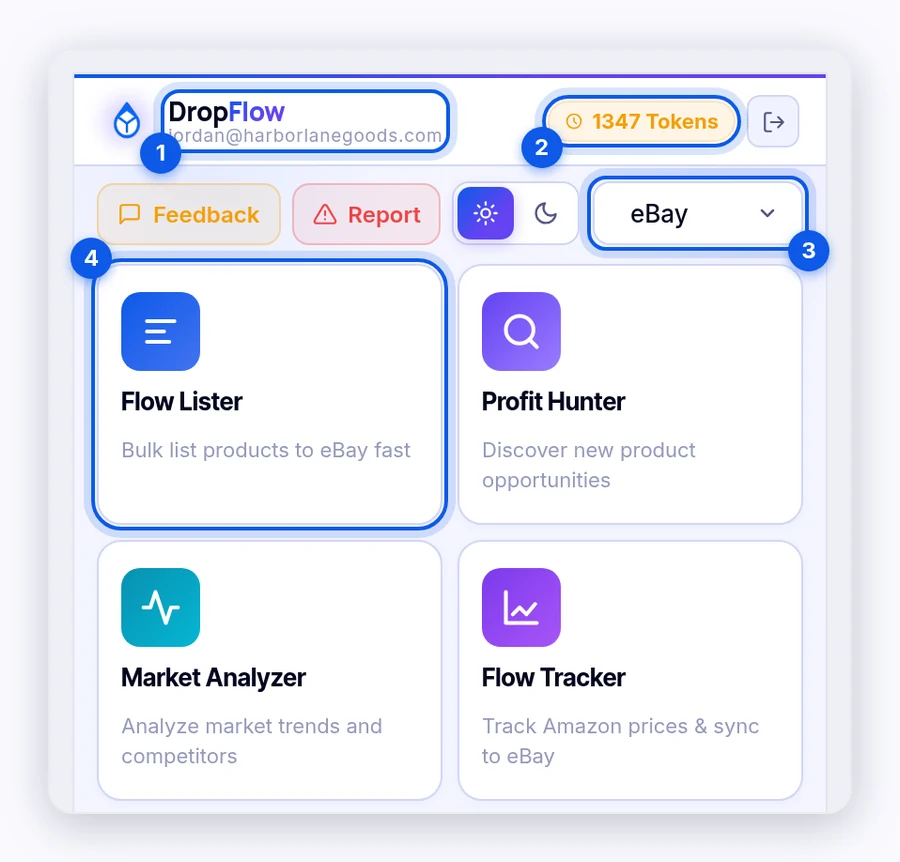
- Header: Shows your email, your Tokens (credit balance), Guide, Report, the light and dark mode switch, and the log-out button.
- Marketplace dropdown: Switch between eBay and Poshmark. The feature cards change to match.
- Feature cards: Each card opens a tool.
eBay cards
| Card | What it does |
|---|---|
| Flow Lister | Bulk lists supplier products to eBay. |
| Profit Hunter | Searches suppliers for products to sell. |
| Market Analyzer | Scans competitor stores to see what sells. |
| Template Builder | Opens the Image Template Editor to design listing images. |
| eBay Settings | Region, AI prompts, VeRO lists, Auto-Scheduling, and more. |
Poshmark cards
| Card | What it does |
|---|---|
| Flow Lister | Bulk lists supplier products to Poshmark. |
| Poshmark Settings | Region, AI prompts, Auto-Scheduling, and more. |
Other cards, like Flow Tracker, Bookkeeping, and Boost My Listings, have their own guides.
Tip: Click Guide in the header to open the DropFlowLister training guide on the website.
Step 5: Set up in this order
- Choose your region. Go to eBay Settings → Region Settings or Poshmark Settings → Region Settings. See Region Settings.
- Create a store. Your store holds your markup and settings. See Stores.
- Pick or build a template. See Image Template Editor.
- Check your AI prompts. The defaults work, but you can edit them. See AI Prompt Configuration.
- List your first product. Use Single Lister for one product, or Flow Lister for many.
Keep DropFlowLister up to date
When a new version is out, the popup shows "Version X available" with an Update ↓ button.
- Click Update ↓.
- Follow the steps on the page that opens. DropFlowLister may also update itself automatically, and older versions may stop working.
- Refresh any open marketplace and supplier pages (press F5).
Some updates are marked as required and look different in the popup. You can still use DropFlowLister, but install them soon.
Some tools can't run at the same time
The eBay Flow Lister shares resources with the Poshmark Flow Lister and with the Market Analyzer and Profit Hunter dashboard. When you open one of these from the popup, DropFlowLister closes the other tab:
- Opening the Poshmark Flow Lister closes the eBay Flow Lister.
- Opening Market Analyzer or Profit Hunter closes the eBay Flow Lister.
- Opening the eBay Flow Lister closes the Market Analyzer and Profit Hunter dashboard.
If the other tool is idle, it closes without asking. If it's busy, you'll see a message such as "Flow Lister is running" or "Market Analyzer / Profit Hunter is running".
Warning: Clicking Close & continue closes the other tab and stops its job right away. Click Cancel to keep it running.
Related articles
Still stuck? Chat with us.
See the Basic troubleshooting checklist, or email contact@dropflowlister.com.