
Feedback: submit, vote on, and track feature requests
Learn how to share feature ideas, vote for the ones you want most, and see what's coming next.
On this page
The Feature Requests screen lets every DropFlowLister user suggest new features and vote on ideas. Requests with more votes show at the top. You can also see which ideas are Up Next and which are Completed.
Key points
- Open it from the popup: Click Feedback.
- Submit an idea with a title, a description, and an optional category.
- Vote by clicking the arrow on a request. Click it again to remove your vote.
- Completed requests can't be voted on.
- Found a bug? Use Report instead. Verified bugs can earn credits.
Before you start
- Sign in to the extension. You need to be signed in to submit or vote.
- Search the list first in case someone already asked for your idea.
How to open Feature Requests
- Click the DropFlowLister icon in your browser toolbar.
- Click Feedback. The Feature Requests screen opens inside the popup.
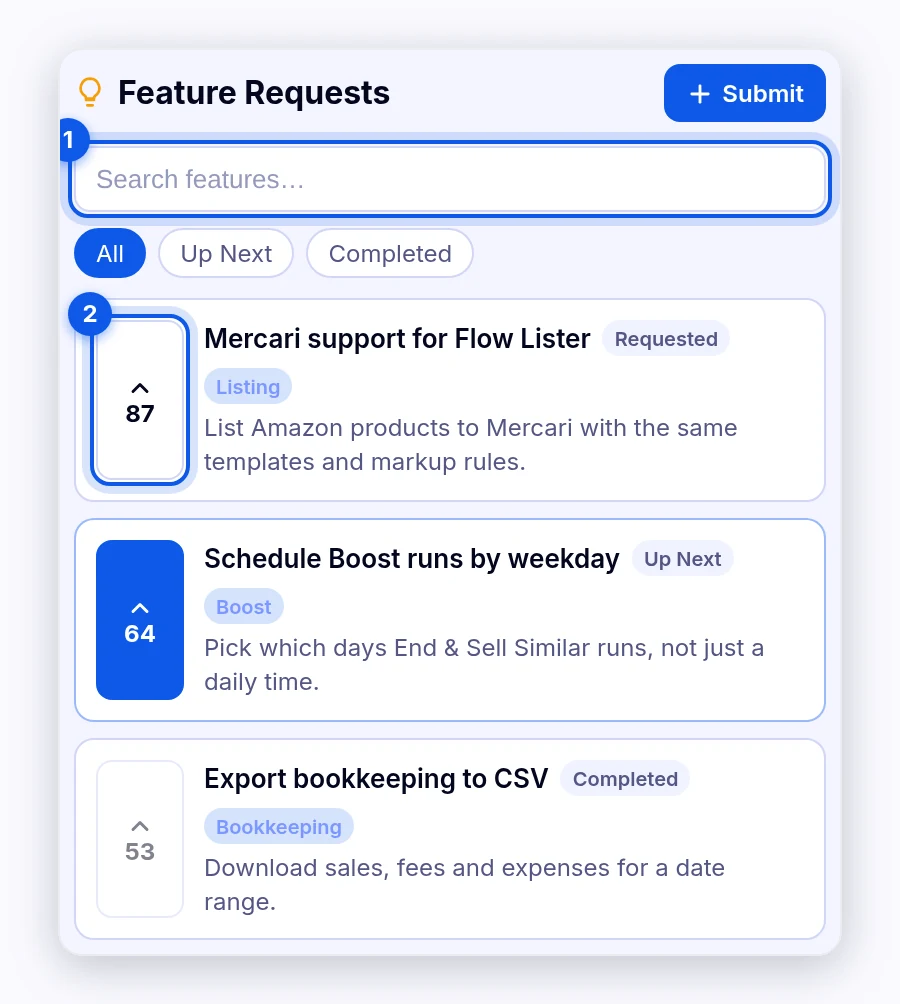
How to find requests
- Type in Search features… to search titles and descriptions.
- Click a filter:
- All: Every request.
- Up Next: Requests the team plans to work on next.
- Completed: Requests that are done.
- Click a card to see its full details.
Each card shows its vote count, title, status (Requested, Up Next, or Completed), and category. The list is sorted by votes, most first.
How to submit a feature request
- Click Submit.
- Enter a Title (5–80 characters), for example "Add bulk export to CSV."
- Enter a Description (20–1,000 characters). Explain what you want and why.
- Choose a Category (optional): General, Listings, Sharing, Pricing, UI, Bug, or Integrations.
- Click Submit Feature.
- Look for "Feature submitted!" Your request appears in the list.
How to vote
- Find a request you want.
- Click the up arrow with the vote count. The arrow turns on and the count goes up.
- To take back your vote, click the arrow again (Remove vote).
Note: You can't vote on Completed requests. The button shows Voting closed.
Tips and limits
- One idea per request. It's easier for others to vote on.
- Vote instead of repeating. If your idea exists, vote for it rather than submitting it again.
- How requests are picked: The list is sorted by votes. The team reviews requests, and you'll see the status update.
Tip: Write the description as a problem you want solved, such as "I need to export orders so I can do my taxes."
Was this helpful?
Related articles
Still stuck? Chat with us.
See Feedback troubleshooting or email contact@dropflowlister.com.