
Report: send bugs, VeRO brands, and restricted keywords
Learn how to report a bug, suggest a VeRO brand, or suggest a restricted keyword from inside the extension.
On this page
The Report window lets you send three kinds of reports to the DropFlowLister team: bug reports, VeRO brand suggestions, and restricted keyword suggestions. VeRO is eBay's program that lets brand owners remove listings that use their brand. Approved brand and keyword suggestions help protect every DropFlowLister user.
Key points
- Open it from the popup: Click Report next to Feedback.
- Three report types: Bug Report, VERO Suggestion, and Keyword Suggestion.
- Verified bugs can earn credits: You'll get 500 credits if your bug is verified and fixed.
- Images are optional on every report type.
- See your history under Your recent submissions.
Before you start
- Sign in to the extension. Reports are tied to your account.
- For a bug, take a screenshot of the problem if you can.
- For a VeRO or keyword suggestion, have the Amazon product link ready.
How to open the Report window
- Click the DropFlowLister icon in your browser toolbar.
- Click Report ("Report a bug or suggest a VERO brand / keyword").
- The Report window opens in its own small window. If it's already open, it comes to the front.
The Report window opens separately so choosing an image doesn't close the popup and lose your entries.
How to report a bug
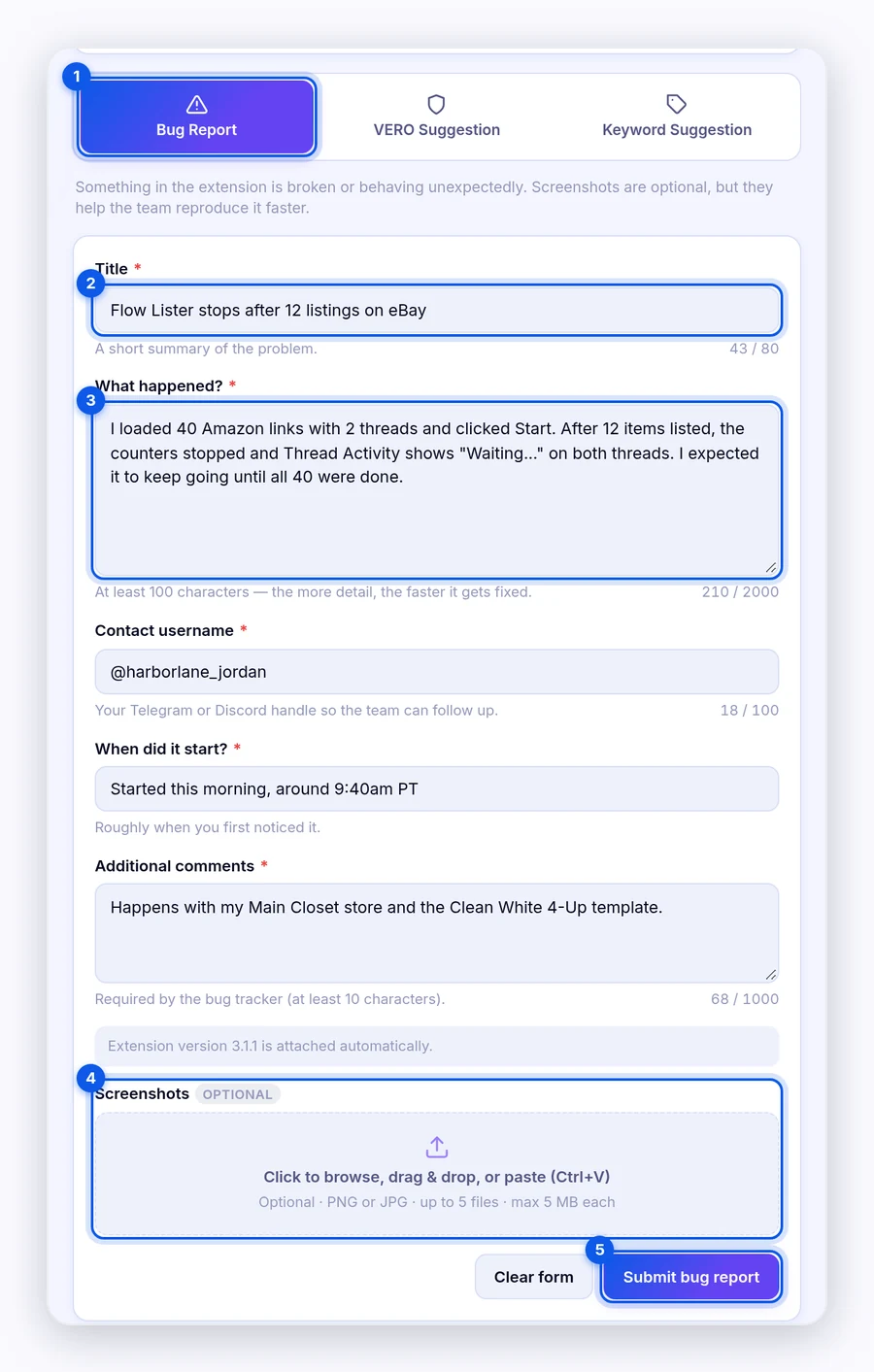
- Choose Bug Report.
- Fill in every field (see the table below).
- Add up to 5 Screenshots (optional). Click to browse, drag and drop, or paste with Ctrl+V.
- Click Submit bug report.
- Look for "Bug report submitted. You will receive 500 credits if the bug is verified and fixed."
| Field | Length | Tips |
|---|---|---|
| Title | 5–80 characters | A short summary, such as "Bulk lister stops after 12 items." |
| What happened? | 100–2,000 characters | Steps to reproduce, what you expected, and what happened instead. |
| Contact username | 2–100 characters | Your Telegram or Discord handle so the team can follow up. |
| When did it start? | 3+ characters | Roughly when you first noticed it. |
| Additional comments | 10–1,000 characters | Affected marketplace, account, or any workaround. |
Screenshots: PNG or JPG, up to 5 files, 5 MB each.
Tip: The more detail you give in What happened?, the faster the team can fix it. Include your extension version, which shows on the form.
How to suggest a VeRO brand
- Choose VERO Suggestion.
- Paste the Amazon product link for a product that shows the brand.
- Enter VERO brand keywords, separated by commas, such as "acoustica, acousticbrand."
- Add one Proof image (optional): PNG or JPG, up to 10 MB.
- Click Submit VERO suggestion.
- Look for "VERO suggestion submitted — pending admin review."
Once an admin approves it, each term is added separately to the VeRO list that protects every DropFlowLister user.
How to suggest a restricted keyword
- Choose Keyword Suggestion.
- Paste the Amazon product link the keyword came from.
- Enter Suggested keywords, separated by commas.
- Add one Proof image (optional): PNG or JPG, up to 10 MB.
- Click Submit keyword suggestion.
- Look for "Keyword suggestion submitted — pending admin review."
Once approved, each keyword is added to the filter the lister already checks titles against. See VeRO and restricted words.
How to see past submissions
- Open the Report window.
- Choose the report type.
- Click Your recent submissions.
Each row shows the title or keywords, the status (such as pending), and the date.
Tips and limits
- Both the link and the keywords are required for VeRO and keyword suggestions. The link must be an Amazon product page, up to 500 characters. Keywords must be 2–500 characters.
- No double sends: If you submit the same report twice within 30 seconds, you'll be asked to wait.
- Clear form empties the current form.
- Review: The team reviews each suggestion, and you'll see the status update.
- Credits: Our team verifies each bug report and adds the 500 credits once confirmed.
Related articles
Still stuck? Chat with us.
See Report troubleshooting or email contact@dropflowlister.com.