
Closet Optimizer: relist, delete, and refresh Poshmark listings
Learn how to relist older Poshmark listings that still get views, remove ones that don't, and set safe rules for each run.
On this page
Older listings can sink in Poshmark search. The Closet Optimizer relists listings that are old enough and still getting impressions, so they look fresh again. It can also delete old listings that get too few impressions. It uses Poshmark's own Copy Listing → Replace Original, which keeps your likes. This article explains the rules, every setting, and the risks.
Warning: The Closet Optimizer can delete active listings that match your filters. Review your filters in ⚙ Settings before every run. Deleting can't be undone.
Key points
- Two rules decide everything: Min days listed and Min impressions. Both are required.
- Old + enough impressions = relist. Old + too few impressions = delete (if deletion is on).
- Newer listings are left alone. Anything under Min days listed isn't touched.
- Always skipped: Sold, sold-out, and Not For Sale items (unless you turn on Delete NOT-FOR-SALE items).
- Deleting can't be undone. You can turn deletion off and only relist.
Before you start
- Sign in to the extension with an active DropFlowLister plan. The optimizer is turned off without one.
- Sign in to Poshmark and open your own closet on the Available view.
- Run Flow Tracker first (Track Items). By default, the optimizer only relists items with a fresh green tracker badge.
How to set up the optimizer
- Open your closet and find the DropFlow widget.
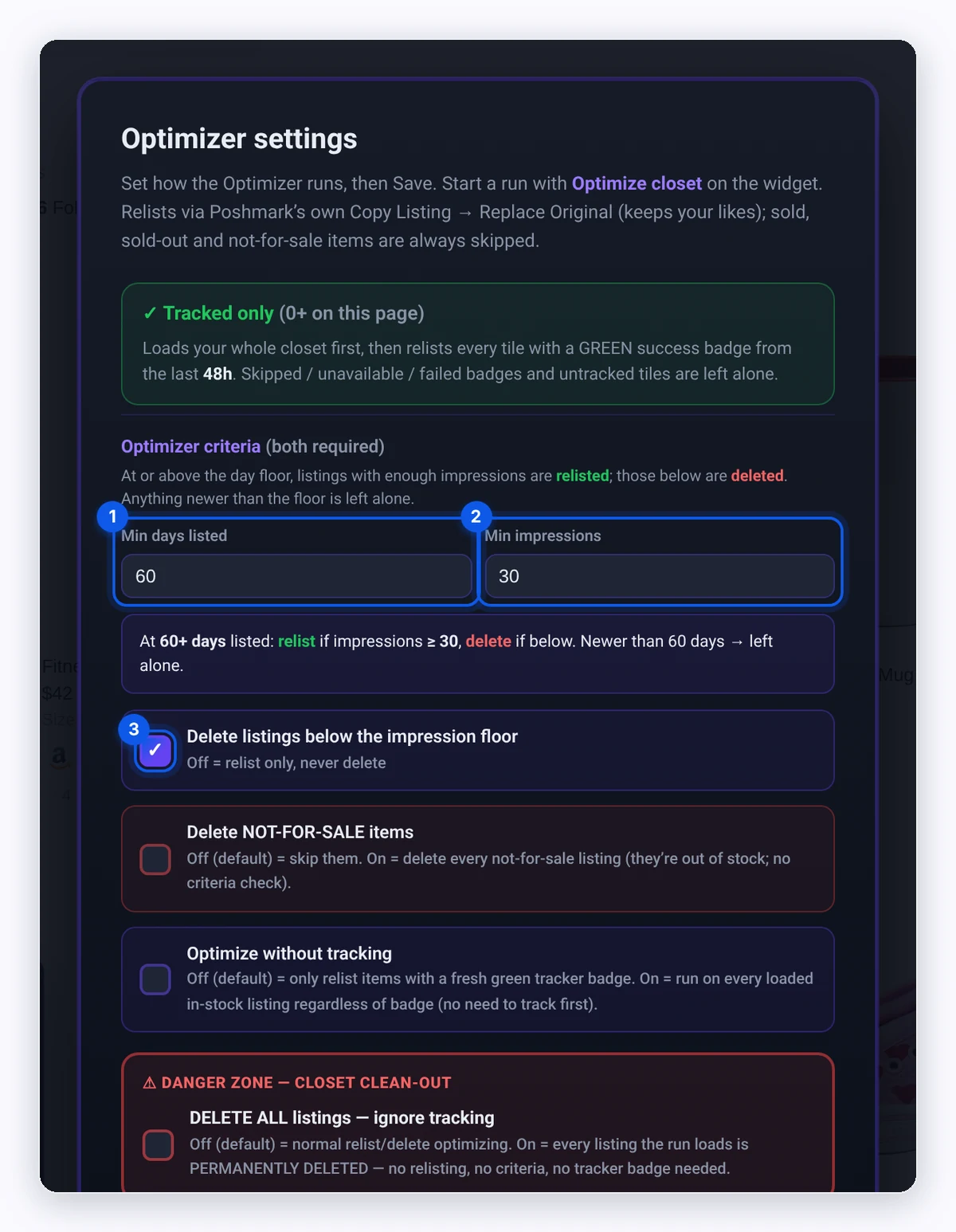
- Open ⚙ Settings for the optimizer. The Optimizer settings window opens.
- Fill in the settings below.
- Click Save.
| Setting | Default | What it does |
|---|---|---|
| Min days listed | 60 | Listings younger than this are left alone. |
| Min impressions | 30 | At or above the day floor: listings with at least this many impressions are relisted. Below it, they're deleted. |
| Delete listings below the impression floor | on | Off means relist only, never delete. |
| Delete NOT-FOR-SALE items | off | On deletes every Not For Sale listing it loads, with no criteria check. |
| Optimize without tracking | off | Off: only items with a fresh green tracker badge. On: every loaded in-stock listing. |
| Don't relist again within (days) | 30 | A listing relisted within this many days is skipped. 0 allows repeats. |
| Tracked-only: hours since last tracked | 48 | A green badge older than this counts as stale and is skipped. |
| Limit — how many listings to load | 0 | 0 means the whole closet. Use a small number to test. |
How to run the optimizer
- Make sure your closet shows the listings you want. The optimizer works on the listings loaded on the page.
- Click Optimize closet on the widget.
- Read the confirm box. It says "OPTIMIZER — this relists AND deletes." or "OPTIMIZER — relist only (deletion is OFF)." and repeats your rules.
- Click OK to start.
- Watch the run panel. It counts Relisted, Deleted, Skipped, Kept (sales history), and Variation sold.
- Use Pause or Stop at any time.
Each listing's page is opened to read its stats, so each item takes a little while.
To optimize one listing, click the ↻ button on its tile ("Optimize this listing with your current settings").
Important: Deleted listings can't be recovered. If you only want to refresh listings, turn off Delete listings below the impression floor.
Danger zone: delete all listings
DELETE ALL listings — ignore tracking deletes every listing the run loads. It ignores days listed, impressions, tracker badges, and the relist cooldown. Sold listings are never touched.
- Set Limit if you only want to clear part of your closet.
- Turn on DELETE ALL listings — ignore tracking and click Save.
- Click Optimize closet.
- Type DELETE ALL in the warning box to confirm.
Warning: This wipes your closet. Deleting can't be undone. Turn the setting off again right after you use it.
What the skip messages mean
- Stale or untracked: The tracker badge is missing or older than your hours setting.
- Already relisted: It was relisted within Don't relist again within (days).
- active offer — can't relist: Poshmark won't relist a listing with an open offer.
- ◈ VARIATION SOLD: A size has sold, so Poshmark won't let it be deleted or relisted.
- Kept (sales history): Poshmark won't fully delete a listing that has sales.
Tips and limits
- Test with Limit. Set Limit to 10 for your first run.
- Duplicates: If a copy goes live but the original can't be removed, you'll see "⚠ N DUPLICATE(S) left". Delete those originals by hand.
- Poshmark's rules apply. What Poshmark lets you relist or delete, and how often, is set by Poshmark, not by DropFlowLister.
Tip: Run Flow Tracker right before the optimizer so your green badges are fresh.
Related articles
Still stuck? Chat with us.
See Closet Optimizer troubleshooting or email contact@dropflowlister.com with a screenshot of the run panel.