
Remove Inactive Listings: set rules, run, and stop the Poshmark Purger
Learn how to delete old, under-performing Poshmark listings with rules you set, and how to keep the listings you want.
On this page
Remove Inactive Listings (the on-page tool is called the Poshmark Purger) clears out old listings that aren't selling. You set the rules, such as "listed 90+ days with 5 or fewer likes." The Purger then checks the inactive listings in your closet and deletes the ones that match all your rules. It only removes inactive Poshmark listings.
Key points
- You must set at least one rule. With no rules, nothing is deleted and the run is refused.
- An inactive listing must match every rule you set to be deleted.
- Only inactive listings are removed. Active listings are never deleted. To clear out active listings, use the Closet Optimizer.
- Sold listings are always skipped.
- Deleted listings can't be recovered. Deleted Poshmark listings can't be restored.
Before you start
- Sign in to Poshmark in the same browser.
- Decide which listings you want gone. Write your rules down first.
- Have your closet open, or let the extension open it for you.
Tip: Try strict rules first, such as a high Min days listed and Max likes of 0. Loosen them later if needed.
How to run Remove Inactive Listings
- Click the DropFlowLister icon in your browser toolbar.
- Choose Poshmark.
- Click the Remove Inactive Listings card.
- Read the pop-up and click OK. Your Poshmark closet opens.
- In the Poshmark Purger window, fill in your rules (see the table below).
- Read the red line under the fields. It sums up what will be deleted, for example "✕ Deletes listings that have been listed 90+ days and have 5 or fewer likes."
- Click Save.
- Read the POSHMARK PURGER confirm box. It repeats your rules and says "This cannot be undone."
- Click OK to start, or Cancel to stop here.
- Watch the PURGER panel in the bottom-right corner of your closet.
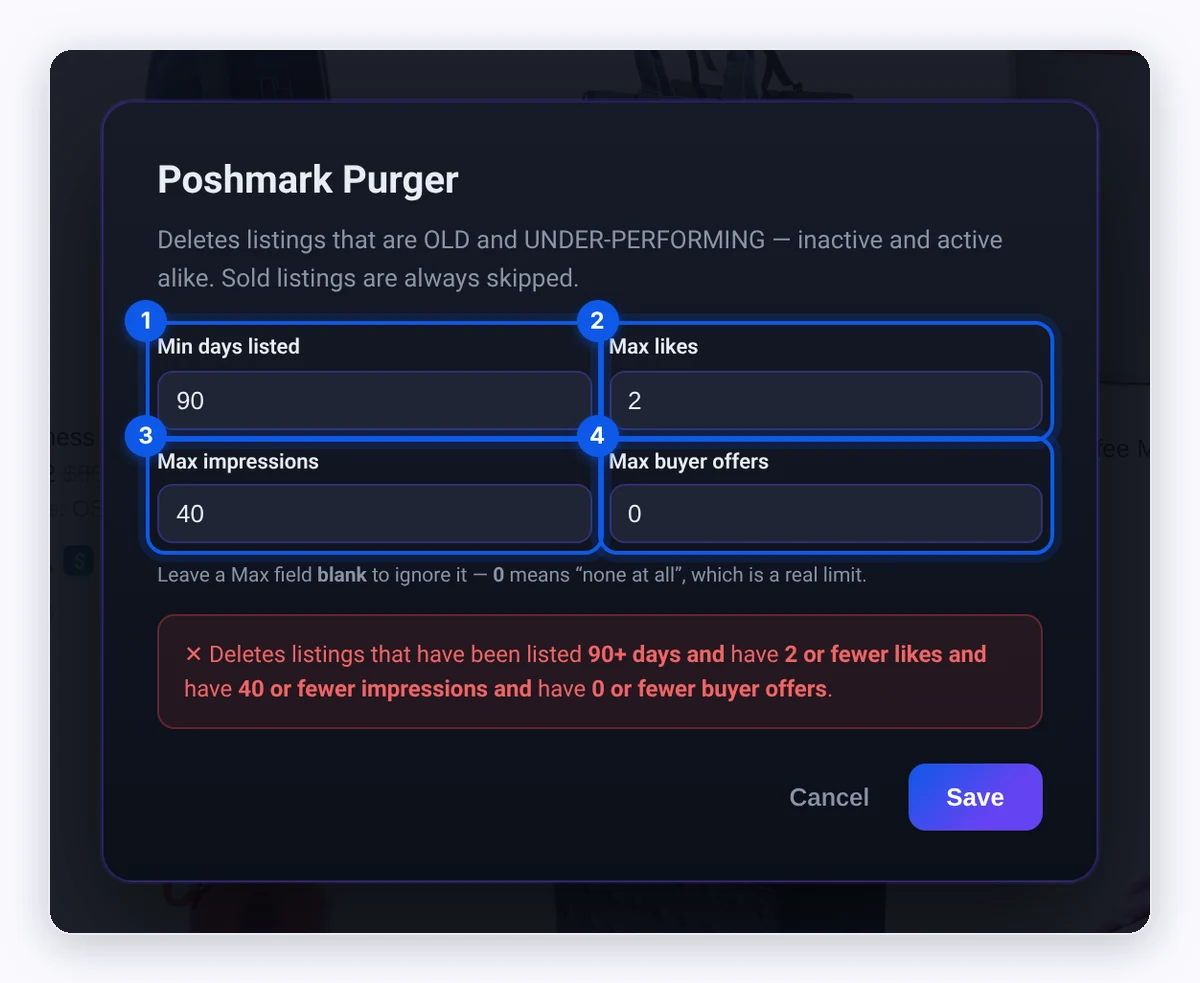
Rule settings
| Setting | Empty or 0 means | What it does |
|---|---|---|
| Min days listed | 0 = any age | Only listings at least this many days old can be deleted. |
| Max likes | blank = ignore | Only listings with this many likes or fewer can be deleted. |
| Max impressions | blank = ignore | Only listings with this many impressions or fewer can be deleted. |
| Max buyer offers | blank = ignore | Only listings with this many buyer offers or fewer can be deleted. |
Blank vs 0 in the Max fields: Blank means "ignore this rule." 0 is a real rule that means "none at all." For example, Max likes 0 only deletes listings with no likes.
Min days listed is 0: You'll see "Min days listed is 0. Brand-new and freshly relisted listings (Days Listed 0) can be deleted. Set it above 0 to protect them." Relisting resets Days Listed to 0, so a value above 0 protects anything you just relisted.
The PURGER panel
The panel shows what's happening and three counts:
- Ended: Listings deleted.
- Skipped: Listings kept because they didn't match, or Poshmark blocked them.
- Failed: Listings that couldn't be deleted because of an error.
The status line shows "Checking: …", "Ending: …", or "Kept (reason): …". Click ⏸ Pause to pause and ▶ Resume to continue. Click ⏹ Stop to end the run.
The Purger scrolls your closet to load more listings. It stops with "Done — no more matching listings." when it finds no more.
What happens to special listings
- Listings with an active offer are skipped. Poshmark doesn't allow deleting them.
- Multi-size listings where a size sold can't be deleted on Poshmark. The Purger sets them to Not For Sale instead, and counts them as Ended. This is intended.
- Sold listings are never touched.
Tips and limits
- It's slow on purpose. The Purger waits a random 8–15 seconds between listings to act more like a person.
- Keep the tab open until the panel says "Finished." or "Stopped."
- Poshmark's rules apply. What Poshmark lets you delete is set by Poshmark, not by DropFlowLister.
- Want to refresh instead of delete? Use the Closet Optimizer to relist listings that still get views.
Important: Every deletion is permanent. Check your rules on the confirm box before you click OK.
Related articles
Still stuck? Chat with us.
See Remove Inactive Listings troubleshooting or email contact@dropflowlister.com with a screenshot of the PURGER panel.