
AI Prompt Configuration: edit, restore, and test title and description prompts
Learn how to change the instructions the DropFlowLister AI uses to write your titles and descriptions, and how to restore the defaults.
On this page
A prompt is the set of instructions sent to the DropFlowLister AI before it writes a listing. DropFlowLister has a Title Prompt and a Description Prompt for each marketplace. You can edit them to match your style, and restore the defaults at any time.
Key points
- Two prompts per marketplace: eBay and Poshmark each have their own title and description prompts.
- Same prompts in two places: Edits in the popup settings and in Flow Lister are the same prompts, so a change in one shows in the other.
- The placeholder matters:
{paste product details…}is where DropFlowLister inserts the product's details. - Restore anytime: Restore Default puts back the built-in prompt.
- Saved on this computer: Prompts are saved in your browser, not to your account.
Before you start
- Run a few listings with the default prompts first, so you know what the AI writes.
- Copy your current prompt into a text file before big changes.
Where to find the prompts
You can edit prompts in either place:
- Popup: Open eBay Settings or Poshmark Settings, then scroll to AI Prompt Configuration.
- Flow Lister: Scroll to the AI Prompt Configuration section in the eBay or Poshmark Flow Lister.
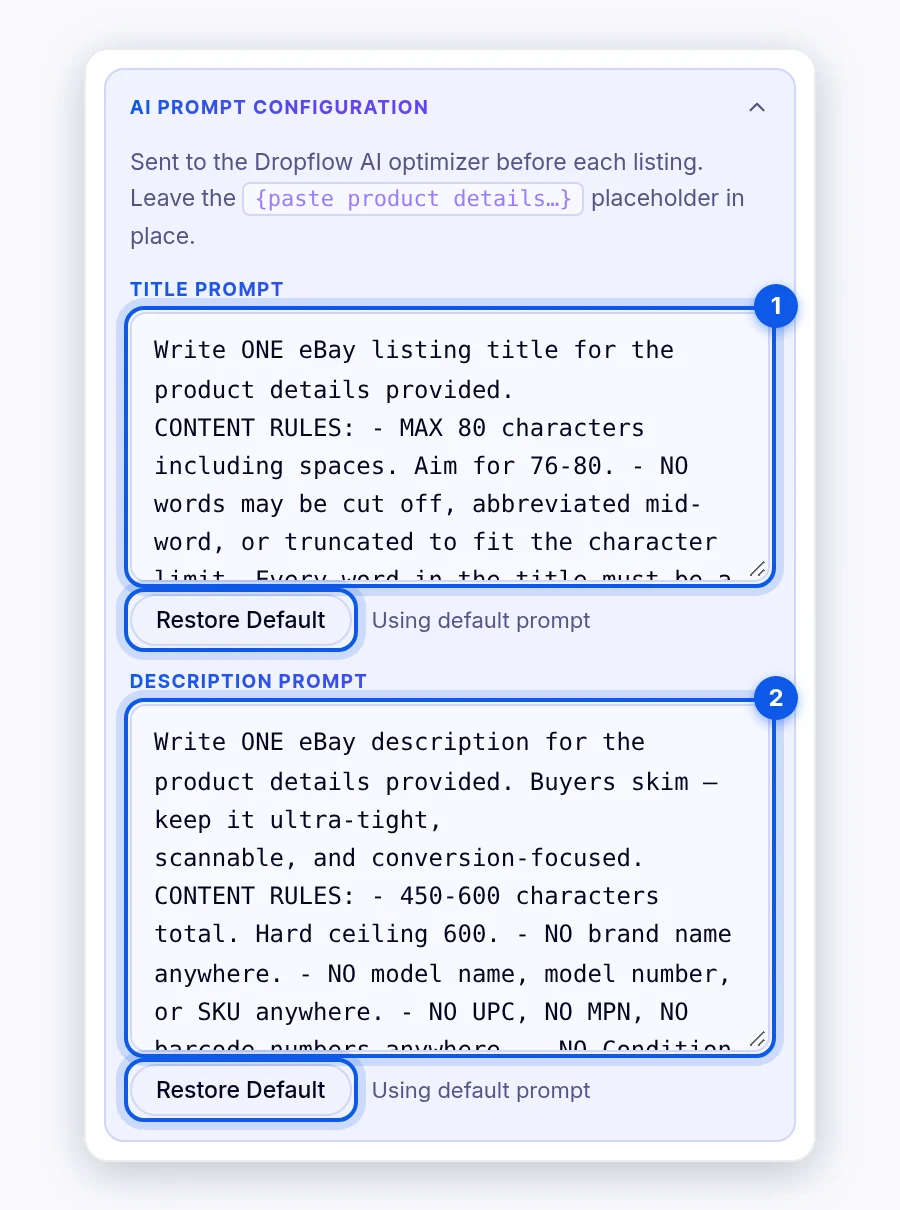
How to edit a prompt
To edit a prompt:
- Click in Title Prompt or Description Prompt.
- Change the instructions, for example the tone, length, or words to avoid.
- Keep the
{paste product details…}placeholder in the text. - Click outside the box. Your change saves automatically.
Important: Keep the {paste product details…} placeholder. DropFlowLister replaces it with the product's title, features, and other details. If you remove it, DropFlowLister adds the details at the end under "PRODUCT INFO:", which can give weaker results.
How to restore the default prompt
To restore it:
- Find the prompt you want to reset.
- Click Restore Default under it.
The built-in prompt comes back right away.
How to test a prompt change
To test:
- Edit your prompt.
- Paste 3–5 links into Flow Lister.
- Make sure AI Title & Description Optimization is on (eBay).
- Set Max Listings to a small number and turn on Enable Max Listings Limit.
- Run Flow Lister and review the titles and descriptions.
On a single product page, you can also try Flowlist (1) in the Single Lister.
Tip: Change one thing at a time. That way you know which edit made the difference.
Tips and limits
- eBay titles are capped at 80 characters by eBay. Ask for short titles in your prompt.
- Don't ask for false claims. Prompts that add features the product doesn't have can break marketplace rules.
- Empty prompts: If a prompt is empty, DropFlowLister uses the default. If eBay optimization still can't get a prompt, the run shows "⚠️ Missing prompt".
- Credits don't change with prompts. Each listing uses 1 credit, no matter how long your prompt is.
Related articles
Still stuck? Chat with us.
See AI Prompt Configuration: troubleshooting, or email contact@dropflowlister.com with your prompt and a sample product link.