
Seller Hub Price Tracker: check prices, sync stock, and purge listings
Learn how to use the DropFlow panel in eBay Seller Hub to update prices and stock in place and to end low performers.
On this page
The DropFlow panel appears on your eBay Seller Hub → Listings → Active page. It has two tools. Price Tracker checks each listing's supplier product and edits the price and quantity right in Seller Hub. Purger ends listings that sell poorly. This article explains both tools and every setting.
Key points
- Works inside Seller Hub: No CSV needed. The panel edits each row on your Active listings page, page by page.
- Matches by SKU: Each row's Custom label (SKU) tells the tracker which supplier product to check (Amazon, AliExpress, or Walmart).
- Keeps a change log: Every price and quantity change is saved in a log in this browser. You can view it or export it as a CSV.
- Blocks risky price cuts: Prices at or below cost, and big drops, are not changed.
- Purger ends listings for good: Ended listings are not relisted by this tool.
Before you start
- Sign in to the extension with an active DropFlowLister plan. The panel only shows for active plans.
- Sign in to eBay and open Seller Hub → Listings → Active.
- In Seller Hub, use Customize to show the Custom label (SKU), Sold quantity, Views, and Start date columns. The tools read these columns.
- Make sure your listings have a SKU. Rows without one show "No SKU on row".
How to open the panel
- Go to Seller Hub → Listings → Active on eBay.
- Look for the DropFlow panel in the bottom-left corner.
- Drag it anywhere you like. Double-click an empty part of the panel to send it back to the corner.
- Click − to collapse it, or + to expand it.
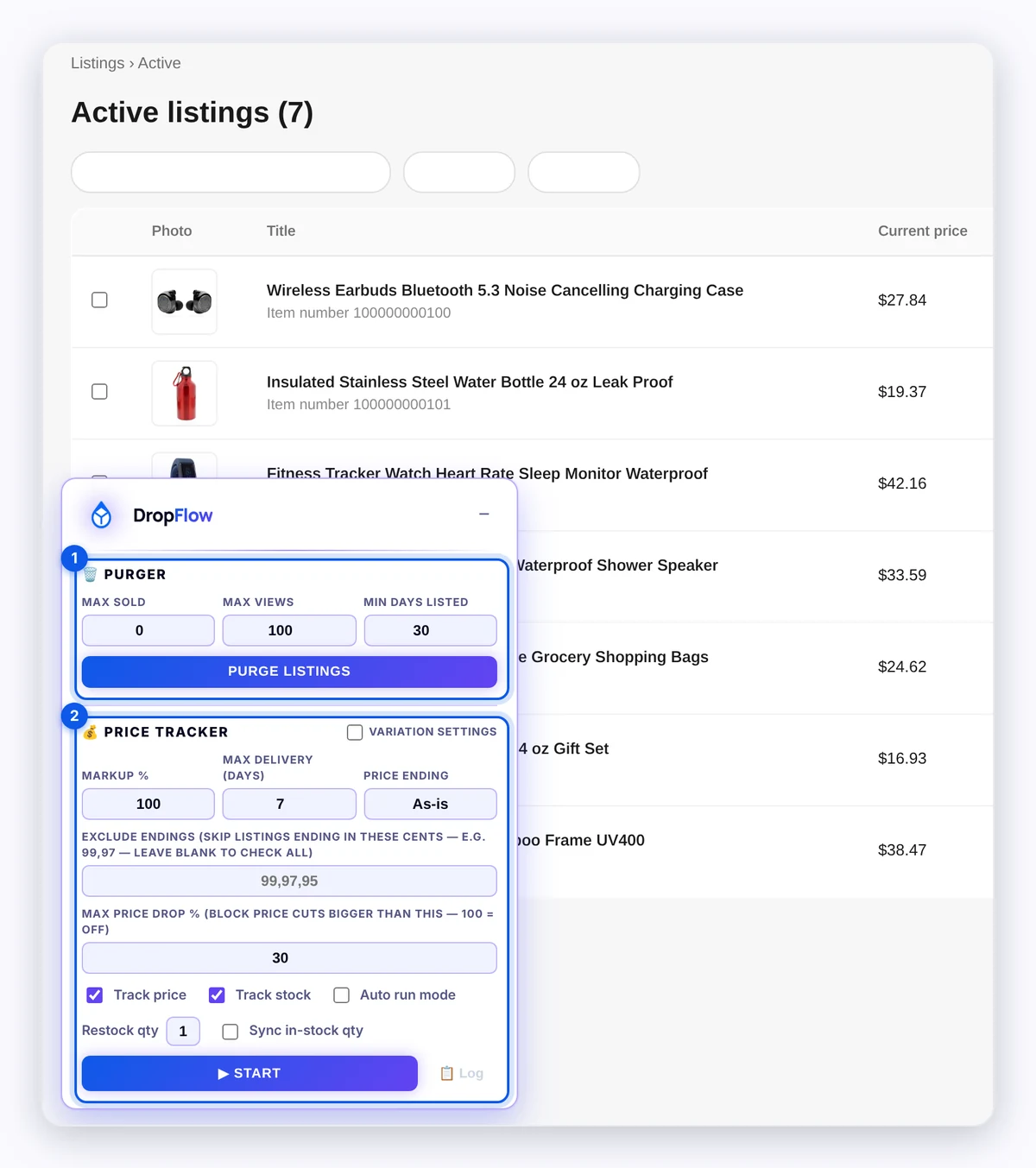
How to run Price Tracker
- Set your Markup %, Max Delivery (days), and Price Ending (see the table below).
- Choose Track price, Track stock, or both.
- Choose whether to turn on Auto run mode.
- Off: the button reads ▶ Start and checks the current page.
- On: the button reads ▶ Start Autorun and keeps moving to the next page. When it reaches the end, it loops back to page 1 and starts a new lap.
- Click ▶ Start or ▶ Start Autorun.
- Watch each row. A status badge appears on every listing, such as "Checking…" or "Price changed: $X → $Y".
- Click ⏸ Pause to pause, or ■ Stop to stop.
Note: Keep this tab open and visible while it runs. The tracker plays a silent sound so Chrome doesn't slow the tab down. You may see a small speaker icon on the tab.
Price Tracker settings reference
| Setting | Default | What it does |
|---|---|---|
| Markup % | 100 | Profit added to the supplier cost. Whole numbers only. |
| Max Delivery (days) | 7 | Items that take longer get quantity 0. |
| Price Ending | As-is | Makes new prices end in .99 down to .90. |
| Exclude Endings | blank | Skips listings whose price ends in these cents, for example 99,97. Blank checks all. |
| Max Price Drop % | 30 | Blocks price cuts bigger than this. 100 turns it off. |
| Track price | on | Lets the tracker change prices. |
| Track stock | on | Lets the tracker change quantity. |
| Auto run mode | off | Keeps going page after page and loops. |
| Restock qty | 1 (1–10) | The quantity an item gets when it comes back in stock. |
| Sync in-stock qty | off | Also moves listings that are already in stock to the Restock qty. |
| Variation settings | off | Opens extra pricing options (below). When on, "Variations on" shows under Markup. |
Variation settings options:
- Supplier Variation Pricing: a markup % for Amazon, AliExpress, and Walmart. Blank uses the global Markup %.
- Variable Pricing by Range: a markup % by supplier cost band. It overrides the other markups. A blank max is open-ended (for example $50+).
- AliExpress Delivery → Max delivery (days): a longer delivery limit just for AliExpress, which often ships in weeks (the box suggests 30). Blank uses the general Max Delivery.
How to view or export the change log
- Click 📋 Log in the Price Tracker section.
- Browse with ← Newer and Older →.
- Click ⭳ Export CSV to save
dropflow-price-tracker-log-<date>.csv. Exports are capped at 100,000 entries, newest first. - To delete everything, click 🗑 Clear All Logs and confirm.
The log is stored only in this browser. Nothing is uploaded.
How to purge low performers
Purger ends listings that match all the rules you fill in.
- Set Max Sold (default 0). Listings with this many sales or fewer match.
- Set Max Views (default 100). Listings with this many views or fewer match.
- Set Min Days Listed (default 30). Only listings live at least this long match.
- Click Purge Listings.
- Wait while it sorts your listings by start date, oldest first. It then selects matching rows on each page and ends them with eBay's Actions → End listings.
- Click Stop at any time.
Leave a field blank to ignore it. At least one field must be set.
Warning: Purger ends listings on eBay. They are not relisted. Double-check your numbers before you click Purge Listings.
Tips and limits
- Price guard: If the new price would be at or below your supplier cost, the row shows "AT COST" or "BELOW COST — price NOT changed".
- Low stock: If the supplier has only a few left, the tracker sets quantity to 0 to avoid overselling.
- Soft bans: If a supplier starts blocking checks, the tracker waits ("Source soft-ban cool-down — resuming in N min") and then tests again.
- Purger safety cap: Purger stops after 20 passes on one page or 200 pages in one sweep.
- eBay limits are eBay's: How many listings you can end or edit at once is set by eBay, not by DropFlowLister.
Tip: Run Price Tracker on one page with Auto run mode off first. Check the badges, then turn on Autorun.
Related articles
Still stuck? Chat with us.
See Seller Hub Price Tracker troubleshooting or email contact@dropflowlister.com with a screenshot, the item number, and the time.