
Plans, credits, and billing: check balance, costs, refunds, and payments
Learn how to check your credits, see what each action costs, get refunds, and manage payments.
On this page
DropFlowLister needs an active plan to work. Each listing uses 1 credit from your balance, and your plan's monthly listing limit equals your credits. This article explains plans, credits, refunds, and payments.
Key points
- A plan unlocks the extension: Without an active plan, DropFlowLister shows a lock screen and hides its on-page tools.
- 1 credit per listing: Every listing uses 1 credit, including AI-optimized listings. Your plan's listing limit equals your credits. The popup shows your balance as Tokens. "Tokens" and "credits" mean the same thing.
- Custom plans: If you need more than the largest plan, Custom plans go up to 100,000 credits a month.
- Free actions: Duplicates, Generate Title, and AI item specifics mapping don't use credits.
- Credits don't expire: Unused credits roll over, including credit packs. You need an active subscription to use them.
- Draft refunds: If eBay saves a listing as a draft, its credit is refunded automatically.
- Payments: Plans are sold by Aurora Asset Management LLC, and payments are processed by Authorize.net.
Before you start
- You have a DropFlowLister account. See Account: create, sign in, reset your password, and sign out.
- You're signed in to the extension.
Plans and trial
Every DropFlowLister plan includes the full feature set. Plans differ only by how many listings (credits) you get each month and by the level of support. Prices are in US dollars, and paying yearly saves 20%.
| Plan | Marketplace | Billed monthly | Billed yearly (per month) | Listings (credits) per month |
|---|---|---|---|---|
| Lite | eBay | $39 | $31.20 | 500 |
| Plus | eBay | $69 | $55.20 | 1,500 |
| Starter | eBay | $125 | $100 | 4,000 |
| Growth | eBay | $225 | $180 | 10,000 |
| Solo | Poshmark | $19.99 | $15.99 | 500 |
| Squad | Poshmark | $64.99 | $51.99 | 4,000 |
| Agency | Poshmark | $125 | $100 | 10,000 |
| Custom | eBay or Poshmark | Pick a package or ask for a quote | 15,000 to 100,000 |
Custom packages come in set sizes. For eBay, they are 15,000, 20,000, 30,000, 50,000, or 100,000 listings a month. For Poshmark, they are 15,000, 25,000, 50,000, or 100,000. Custom plans go up to 100,000 credits a month.
These eBay plans work through the Chrome extension. eBay plans that connect straight to eBay through its API are "coming soon," with preview prices that may change at launch: Hook $29.99 (300 listings), Launch $49.99 (750), Grow $74.99 (1,500), Scale $124.99 (3,000), and Custom (5,000 or more).
-
Support: Lite, Plus, and Solo include email support. Starter, Growth, Squad, and Agency include priority support and a 1-on-1 onboarding call. Custom plans get dedicated support.
-
Features: Every plan includes the Product Importer, Bulk Product Importer, Automated Orders, Order Manager, Draft Manager, Products Manager, Full Business Dashboard, Price & Stock Monitor, Product Research Tool, Smart Pricing Rule System, Advanced Bulk Changes, Product Image Editor, Product Variation Support, One-Click Drafts in the extension, and Custom Branding.
-
Extras: Every plan includes the DropFlowLister Mastery Video Course and access to the private community.
-
Money-back guarantee: Lite, Plus, and Solo come with a 30-day money-back guarantee.
-
Credits: Your plan's monthly listing limit equals your credits. For example, Lite's 500 listings a month means 500 credits. Each listing uses 1 credit.
-
Trial: Every plan starts with a 14-day trial for $1 that includes the full feature set. A card is required. When the trial ends, the plan you picked starts automatically at its regular price unless you cancel online before the 14 days are up.
-
If you cancel during the trial: when it ends you'll see a trial-ended message ("Your free trial has ended" in the current app) with an Upgrade Now button.
To see plans:
- Go to
https://dropflowlister.com/pricing/. - Pick a plan and follow the steps.
The Upgrade Now, Choose a Plan, Manage Subscription, and Update Payment buttons on lock screens open the same pricing page.
How to check your credit balance
To check it:
- Click the DropFlowLister icon in the Chrome toolbar.
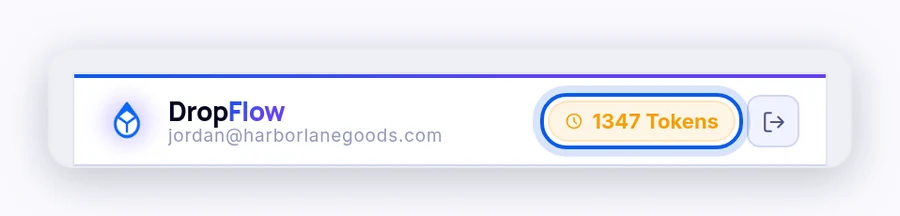
- Look at the Tokens pill in the header.
The number is your credits remaining.
What each action costs
| Action | Credits |
|---|---|
| Single Lister Simple list, Flowlist, or Snipelist | 1 per listing |
| Flow Lister for eBay, with or without AI Title & Description Optimization | 1 per listing |
| Flow Lister for Poshmark | 1 per listing |
| A product already listed in your store | 0 |
| Generate Title (Single Lister) | 0 |
| AI item specifics mapping | 0 |
| Amazon order data saved to Bookkeeping | 0 |
| Research, price and stock tracking, Poshmark order tools, and ETA messages | 0 |
Note: AI Image Enhancement runs on your own Replicate account, and Replicate bills you for each image. DropFlowLister doesn't charge credits for it. See AI Image Enhancement.
When credits are refunded
- eBay drafts: If eBay saves your listing as a draft because required item specifics are missing, DropFlowLister refunds that listing's credit automatically.
- Refund failed: If you see "⚠️ Credit could not be auto-refunded.", email contact@dropflowlister.com with the product link and time.
- Failed listings: If a listing fails, including when AI optimization fails, its credit is refunded automatically. There's no limit on automatic refunds.
- Manual refunds: To ask for a manual refund, email contact@dropflowlister.com.
How to earn free credits
You can earn 500 credits by reporting a bug that's verified and fixed.
To report a bug:
- Click Report in the popup header.
- Pick Bug Report.
- Describe what happened in at least 100 characters, and add screenshots if you can.
- Submit the report.
You'll see "Bug report submitted. You will receive 500 credits if the bug is verified and fixed." Our team verifies each report and adds the credits once confirmed.
How to get more credits
Your plan's monthly listing limit equals your credits. To get more credits:
- Upgrade your plan to one with a bigger listing limit, or ask about a Custom package (15,000 to 100,000 credits a month).
- Buy a one-time credit pack from your dashboard.
You can upgrade, downgrade, or switch marketplace plans from your account at any time. Upgrades usually start right away, and downgrades start at your next billing period.
Credits are yours once you pay for them. Plan credits and credit packs don't expire, and unused credits roll over to the next month. You need an active subscription to use them.
How to update your payment method
If a payment fails, you'll see "Payment past due".
To update it:
- Click Update Payment on the lock screen.
- Update your billing details on the DropFlowLister website.
- Go back to the lock screen and click I've updated my plan — Re-check.
When it works, you'll see "Access restored — taking you back…".
Important: Charges show on your card statement as DropFlow. Payments are processed by Authorize.net for Aurora Asset Management LLC.
How to cancel
Plans renew automatically until you cancel. To cancel:
- Go to your account settings on the DropFlowLister website, or email contact@dropflowlister.com.
- Cancel your plan.
Your plan stays active until the end of the period you paid for, and then it doesn't renew. Your unused credits stay on your account, but you need an active subscription to use them. Plans can't be paused, only cancelled.
If your plan is cancelled, you'll see "Subscription cancelled".
Refund policy
DropFlowLister offers a 30-day money-back guarantee on the Lite, Plus, and Solo plans, billed monthly or yearly.
- What it covers: Your first paid purchase of one of these plans, if you ask within 30 days of your first payment. You get the full payment back, and the plan is cancelled.
- Limits: One refund per customer. It doesn't apply to accounts suspended for breaking the Terms of Service.
- Not refundable: Other plans, renewals, partial billing periods, upgrades, add-ons, and fees charged by third parties, such as marketplaces or suppliers.
To ask for a refund:
- Email contact@dropflowlister.com with the subject Refund Request.
- Include your account email, your plan, your payment date, and the reason.
Refunds go back to your original payment method, and you'll hear back within a few business days. The full policy is at https://dropflowlister.com/dropflow-lister-refund-policy/.
Important: Contact support before you file a chargeback with your bank. Support can usually fix billing problems faster.
Related articles
Still stuck? Chat with us.
See Billing and access errors, or email contact@dropflowlister.com from your account email.