
Profit Hunter: search suppliers, filter products, and send links to Flow Lister
Learn how to turn search terms into a filtered list of supplier products and send them to Flow Lister in one click.
On this page
Profit Hunter is DropFlowLister's product research tool. You give it product titles or keywords, and it searches a supplier, filters the results by price, reviews, rating, and more, and collects the best matches. You can then send the links to Flow Lister. Some older buttons call it "Product Hunter".
Key points
- Suppliers: Amazon, AliExpress, or Walmart. You can also add AliExpress and Walmart results to an Amazon search.
- Fast filters: Price, reviews, rating, delivery days, Amazon's Choice, Best Sellers, and more.
- Protection built in: VeRO brand and keyword filters, restricted words, and duplicate protection.
- One page per term: Profit Hunter reads the first page of supplier results for each term. This keeps supplier blocks low.
- One-click transfer: Transfer → eBay Flow Lister sends your results straight to Flow Lister.
Before you start
- You're signed in to DropFlowLister with an active plan.
- Your eBay region is set in the popup. Profit Hunter shows it in the region badge.
- Have a list of product ideas, one per line. You can collect titles from eBay search results with Fetch Titles, or from Market Analyzer with Send to Hunter.
How to open Profit Hunter
To open it:
- Click the DropFlowLister icon in the Chrome toolbar.
- Pick eBay in the marketplace dropdown.
- Click the Profit Hunter card ("Discover new product opportunities").
Profit Hunter opens in the eBay Dashboard, on the Profit Hunter tab. The other tabs are Market Analyzer and Results.
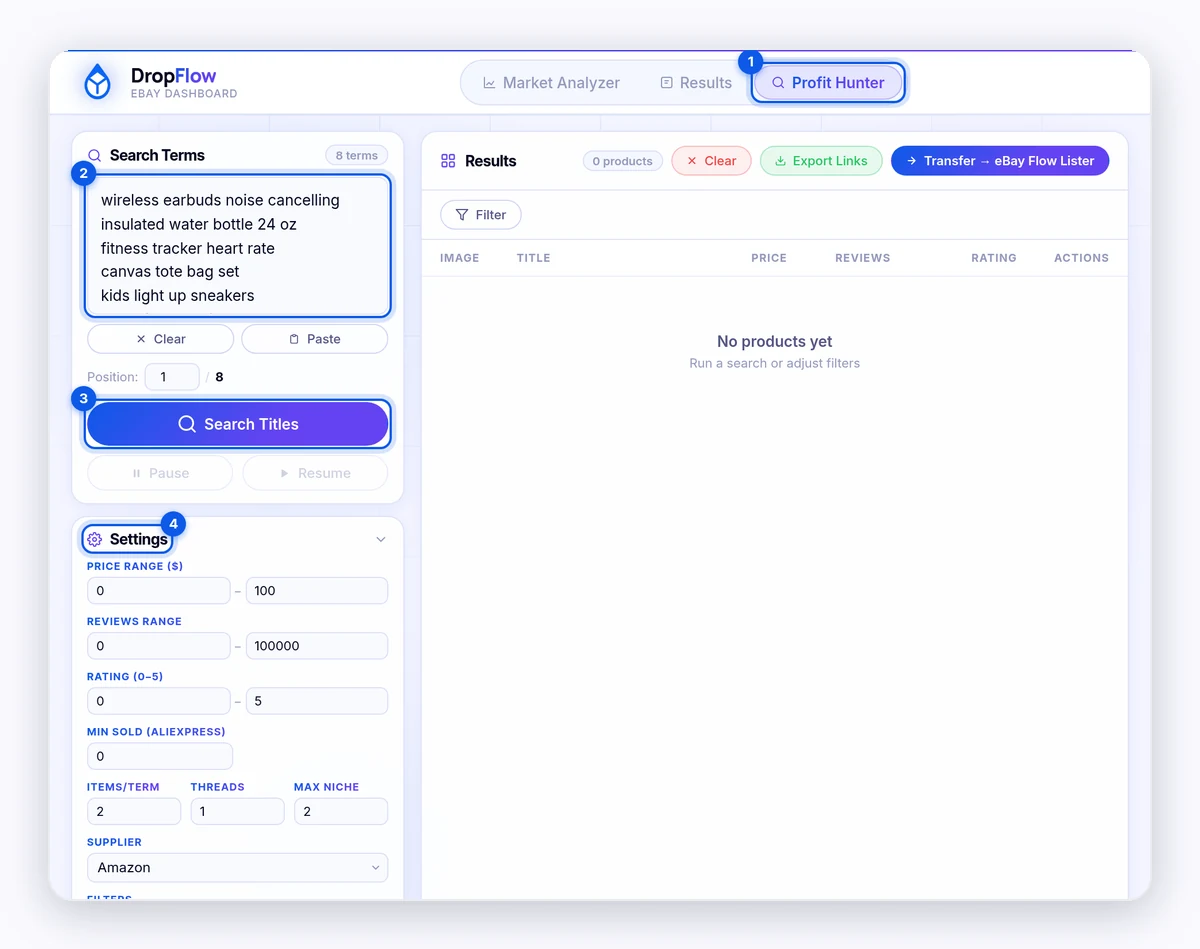
How to run a search
To search:
- Type or paste terms into Search Terms, one per line. Click Paste to paste from your clipboard.
- Set Position if you want to start partway down your list.
- Choose your settings (see below).
- Click Search Titles.
- Watch the progress bar. Click Pause or Resume as needed.
When it's done, you'll see "Search complete!".
Settings reference
Search settings
| Setting | Default | What it does |
|---|---|---|
| Price Range ($) | 0–100 | Keeps products in this price range. |
| Reviews Range | 0–100,000 | Keeps products with this many reviews. |
| Rating (0–5) | 0–5 | Keeps products with this star rating. |
| Min Sold (AliExpress) | 0 | AliExpress only. Keeps items with at least this many sold. |
| Items/term | 2 | How many products to collect for each search term. |
| Threads | 1 | How many terms to search at once. More is faster but more likely to trigger supplier blocks. |
| Max Niche | 2 | A second cap on products per term. The smaller of Items/term and Max Niche wins. |
| Supplier | Amazon | The supplier to search: Amazon, AliExpress, or Walmart. |
Filters
| Filter | What it does |
|---|---|
| Amazon's Choice | Puts Amazon's Choice products first. |
| Best Sellers | Puts best sellers first. |
| Sort by reviews | Sorts results by review count. |
| Duplicate protection | Skips products already in your results. On by default. |
| VERO Brand protection | Blocks products whose brand or title matches a VeRO brand. |
| VERO Keyword protection | Blocks products whose title has a VeRO keyword. |
| Remove books | Leaves out books. |
| Amazon is seller | Keeps only items sold by Amazon. |
| Max delivery days | Keeps items that arrive within the number of days you set (7 by default). |
| Also search AliExpress | Adds AliExpress results. |
| AliExpress: US only | On: only US-warehouse, free-shipping AliExpress items. Off: also includes items from other countries. |
| Also search Walmart | Adds Walmart results. |
| Required keywords | Keeps products whose title has your keywords. Pick All present or Any present. |
| Restricted words | Leaves out products whose title has these words. Load Defaults adds the built-in list. |
| VERO Brands | The VeRO brand list. Edits reset on refresh. Click Refresh from Server to update it. |
Note: Walmart only offers free shipping on items priced $35 and above. If your price range starts lower, Profit Hunter warns you. This is a Walmart rule.
How to review your results
The Results table shows the image, title, price, reviews, rating, sold count, and product ID for each product.
To narrow results:
- Click Filter.
- Set Min $, Max $, Min Rev, Max Rev, or Min Sold.
- Click Apply.
Click Sort to change the order. Use the page buttons and the per page menu (25, 50, 100, or 200) to move through results.
How to send results to Flow Lister
To send them:
- Click Transfer → eBay Flow Lister.
- Wait for "Collected products successfully pushed to eBay Flow Lister. N new links added."
- Open Flow Lister, apply your store, and click Start.
To copy links instead, click Export Links, then Copy All.
Tip: Clear or transfer old results before a new search. If results are already waiting, Profit Hunter asks you to Continue (keep them and add new ones) or Cancel (stay and transfer them first).
Tips and limits
- Use specific terms. "stainless steel garlic press" finds better matches than "kitchen".
- Keep threads low on Amazon. Supplier blocks come from the supplier, not from DropFlowLister.
- Profit Hunter doesn't use listing credits. Only listings use credits, so Profit Hunter searches are never charged.
Related articles
Still stuck? Chat with us.
See Profit Hunter: troubleshooting, or email contact@dropflowlister.com with your search terms and settings.