
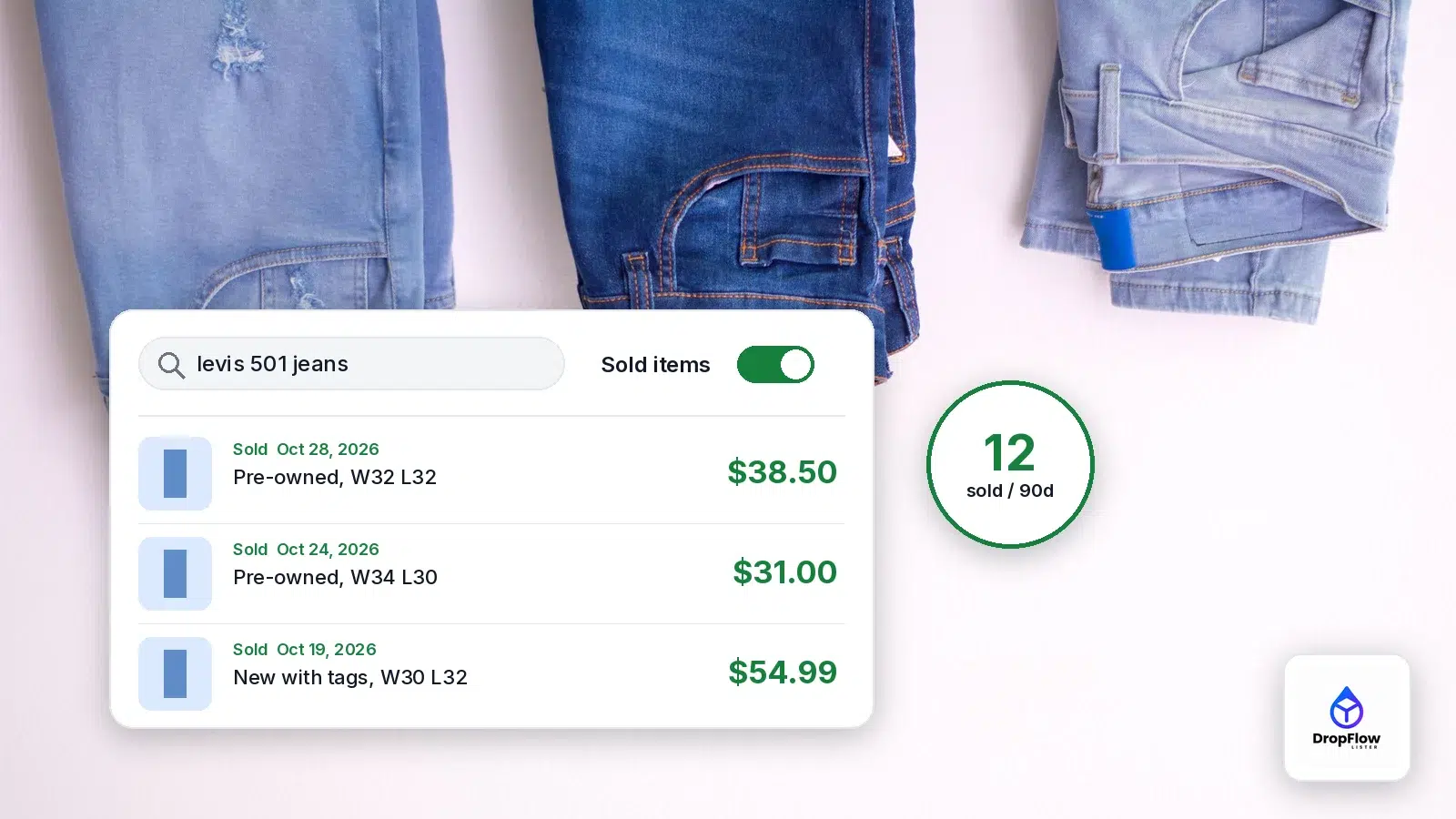
Here is how to see sold items on eBay: search for the item, then turn on the Sold Items filter. Sold prices show what buyers actually paid, so they are a far better pricing guide than asking prices on active listings. This guide covers the desktop and app steps, Advanced Search, the sign-in step eBay now asks for, and how to look back 3 years. It also shows where to find your own eBay sales history. We checked every step on eBay on November 1, 2026.
At the end, we show how to check how many units sold right on the search results page with DropFlowLister, the dropshipping automation software for eBay and Poshmark.
TL;DR: How Do You See Sold Items on eBay?
- Desktop: search the item, scroll the left filter column to Show only, and tick Sold Items.
- App: search, tap Filter, tap Show More, switch on Sold Items, then show the results.
- Sign in first: in our November 1, 2026 test, eBay sent signed-out sold searches to its sign-in page.
- How far back: sold search covers about 90 days. Product research in Seller Hub covers up to 3 years.
- Your own sales: My eBay and Seller Hub, Orders, for the last 2 years.
- Faster sell-through checks: DropFlowLister adds a sold-count badge to eBay results. Plans start at $19.99/mo for Poshmark and $39/mo for eBay. See DropFlowLister pricing.
How to See Sold Items on eBay (Desktop)
On a computer, the sold filter lives in the left-hand filter column of any eBay search. Here is how to see sold items on eBay, step by step:
- Sign in to eBay with any account, buyer or seller.
- Type the item into the search bar and press Search.
- Scroll down the left filter column to the Show only section.
- Tick Sold Items. The page reloads with listings that ended in a sale.
- Narrow the results with Condition, Buying Format and the other filters on the left.
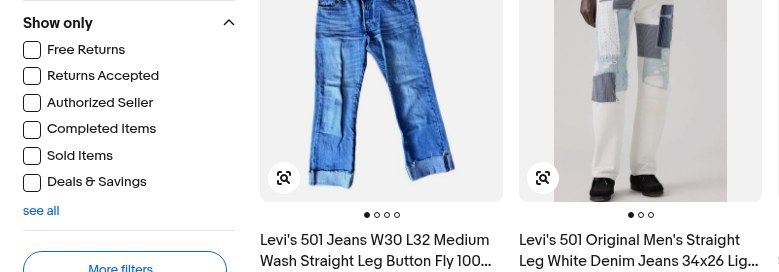
Source: eBay.com search results, captured November 1, 2026.
Turn on the Sold Items filter
The Show only section sits below Condition, Buying Format and Item Location. In our capture, it listed Free Returns, Returns Accepted, Authorized Seller, Completed Items, Sold Items and Deals and Savings. So if you only tick Completed Items, you get a different list, which we explain below.
There is also a shortcut. Adding &LH_Sold=1&LH_Complete=1 to the end of an eBay search address turns the sold filter on (we tested it on November 1, 2026). Bookmark that address for products you check every week.
How to see recently sold items first
By default, results load in Best Match order. To see the newest sales at the top, open the Sort menu and sort by date, most recent first, which Android Authority notes you can do for sold items. As a result, the latest sale prices sit at the top of the page.
How to View Sold Items on eBay Mobile (App)
Learning how to see sold items on eBay in the app takes one extra tap, because the app hides the sold filter a little deeper than the website. In current versions of the app, the steps are:
- Open the eBay app and check that you are signed in.
- Search for the item.
- Tap Filter.
- Scroll down, tap Show More and switch on Sold Items. Turning it on also switches on Completed Items.
- Tap Show Results.
These steps match Android Authority’s walkthrough. If the toggle is missing, make sure you are signed in, tap Show More to expand the full filter list and update the app. Alternatively, open eBay in your phone’s browser and use the desktop steps.
How to Use eBay Advanced Search for Sold Listings
eBay advanced search for sold items is the best choice when a plain search returns too much noise. The Advanced Search page lets you combine several filters in one go:
- Keywords and keyword options: All words, any order; Any words, any order; Exact words, exact order; or Exact words, any order.
- Exclude words from your search: drop words such as “parts” or “box only”.
- Search Including: tick Sold items. Completed items and Title and description sit in the same group.
- Price: set a minimum and maximum.
- Condition: New, Used or Not specified.
- Sellers: under Only show items from, enter specific seller user IDs to include or exclude.
Finally, click Search. The seller option is useful for studying one competitor’s sold items.
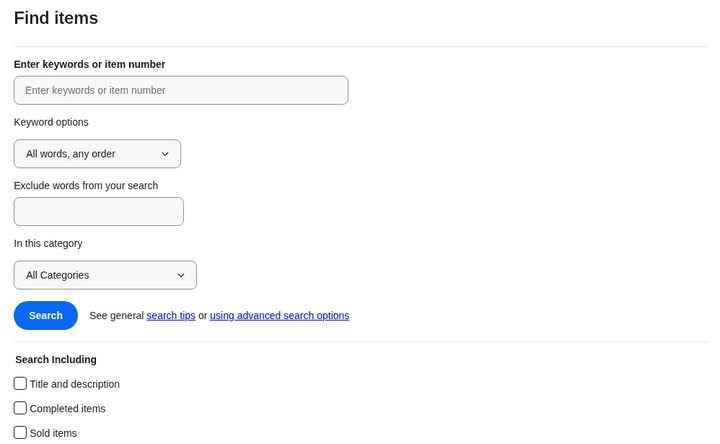
Source: eBay Advanced Search, captured November 1, 2026.
Sold Listings vs eBay Completed Listings
eBay completed listings and sold listings are not quite the same thing. eBay’s own help page notes that it calls items you have sold “completed” or “ended” listings. However, the Completed Items filter in search also brings in listings that ended without selling, so tick Sold Items when you only want real sale prices. As Android Authority puts it, completed listings show all past listings, whether they sold or not.
| Filter | What you see | Best use |
|---|---|---|
| Sold Items | Listings that ended with a sale | Pricing: what buyers paid |
| Completed Items | Ended listings, sold and unsold | Spotting prices that were too high |
| Product research | Up to 3 years of eBay sales data | Trends, seasonality and sell-through |
Either way, search results only go back so far. According to eBay’s Product research help page, completed listings results include listings that ended in the previous 90 days.
Why Can’t I See Sold Listings?
When the sold filter seems to vanish, the cause is usually one of the four below.
You may need to sign in
On November 1, 2026, we ran the same search three ways from a signed-out browser. The plain search loaded normally. In contrast, the sold version went through a security check and then to eBay’s sign-in page. The fix is simple: sign in with any eBay account.
The app filter is under Show More
In the app, Sold Items is not in the first set of filters. Tap Filter, scroll down and tap Show More to find it. If it is still missing, update the app or use eBay in your phone’s browser.
Best Offer prices are hard to read
When a seller accepts a Best Offer, the agreed price is what matters. eBay says Product research shows “the actual price that the item sold for, even if a Best Offer was accepted.” So check Best Offer items there.
The sale is older than 90 days
Sold search does not reach further back than about 90 days. Therefore, for older sales, use Product research, covered below.
How to Read Sold Results (and Avoid Bad Comps)
Knowing how to see sold items on eBay is the easy part. However, reading them well takes a little discipline:
- Match the condition. Compare new with new and used with used.
- Add shipping. Look at the item price plus the shipping the buyer paid, since that is the real total.
- Drop the outliers. Ignore odd lots, bundles and one-off highs or lows.
- Use the median. Sort the remaining prices and take the middle one, because it is less skewed than the average.
- Count the sales. Ten sales in 90 days tells you more than one lucky sale.
Next, compare sold counts with active listings for the same search. Many sold and few active usually means room for another seller. On the other hand, many active and few sold means the market is crowded.
See Up to 3 Years of Sold Data With Product Research
If you want to see sold items on eBay from further back, use Product research. It is eBay’s research tool, often called Terapeak. It sits on the Seller Hub Research tab, and eBay says it is also available in the mobile apps. According to eBay’s help page, it gives access to the last 3 years of eBay sales data, including:
- Sales trends and the sold price range
- Average sales price
- Average shipping costs and the number of listings offering free shipping
- Sell-through rate, for searches of items sold 90 days ago or less
- Total number of sellers who sold the item, and the selling format
You can also pick any date range from one day to 3 years. Moreover, you can filter by condition, price range, format, buyer and seller location, and product codes such as UPC or ISBN. This makes it the right tool for seasonal items, because 90 days of sold search cannot show last year’s holiday peak.
How to Check eBay Price History for an Item
To check eBay price history for an item, start with the Sold Items filter from the desktop steps above and sort by most recent first. That shows what the item actually sold for over the last 90 days. For a longer view, run the same search in Product research and set the date range to as much as 3 years, then read the average sales price and sold price range across that period.
How to See Your Own Sold Items (My eBay and Seller Hub)
If you searched “my ebay sold” or “ebay sales history,” you want your own past sales, not other sellers’. eBay’s help on finding items you’ve sold says you can find them for the last 2 years in either place:
- Seller Hub: open the Orders tab. Then search by buyer, order status (for example awaiting payment) or time frame.
- My eBay: open the Orders section.
Each sale also gets a 12-digit order number, which you can search in Seller Hub. To keep records, the Orders tab also lets you download an orders report, as eBay’s Seller Hub help page describes. For a full tour of every tab, read our guide to eBay Seller Hub.
How Many Sold? Checking Sell-Through Faster
Checking sold items on eBay one search at a time works. Still, it is slow when you research dozens of products. That is where the DropFlowLister eBay search tools help. They add a row of icons under each listing on eBay search results, plus a toolbar.
The sold-count badge on search results
Click Check How Many Sold under any result, and a badge such as “12 sold / 90d” appears. The window follows the Items Sold Within setting in Market Analyzer, and it is 90 days if you have not set it. The same icon row also opens that seller’s sold items, searches eBay for sold items like this one, and opens eBay’s free Product research for the item.
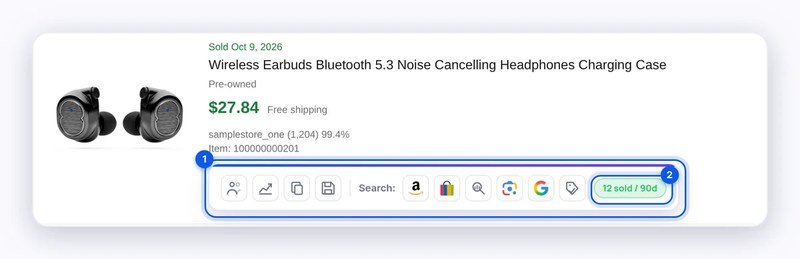
Source: DropFlowLister Help Center, eBay search tools, captured November 1, 2026.
From a sold listing to a supplier search
Once a product looks good, the Search Amazon icon searches Amazon for the listing title. Meanwhile, the toolbar’s Fetch Titles button sends qualifying titles from the page to Profit Hunter, so you can look for them at suppliers in bulk. To study whole stores, Market Analyzer scans competitor sellers, and its Total Sold History option collects sold counts over time. All of these tools are part of the Product Finding Suite, and they work on eBay US and Canada.
For a wider method, see how to find winning dropshipping products and our guide to AI product research for eBay.
Turn Sold Comps Into a Price
In the end, sold data only pays off when it turns into a price. Keep it to three steps:
- Take the median sold price, including shipping, from matching listings.
- Subtract eBay fees, your item cost and shipping to see what you keep.
- Adjust up or down based on how many sold and how many are active.
Check the numbers with our eBay profit calculator. When the numbers work, Flow Lister lists the matching supplier product to your eBay store or Poshmark closet, so your sold comps turn into live listings. Our guide to bulk listing on eBay and Poshmark shows how a batch run works. Then read the full method in how to price items on eBay using sold comps and real fees.
How to See Sold Items on eBay: FAQ
How far back do eBay sold listings go?
Sold search covers about 90 days. Product research in Seller Hub covers up to 3 years.
Can you see sold items on the eBay app?
Yes. Search, tap Filter, tap Show More, switch on Sold Items and show the results. Make sure you are signed in.
Why don’t I see the Sold Items filter?
Usually you are signed out, or, in the app, the filter is hidden under Show More. So sign in, tap Show More, update the app, or use the website.
How do I see what a Best Offer item actually sold for?
Use Product research. eBay says it shows the actual sold price, even when a Best Offer was accepted.
How do I see my own sales history on eBay?
Go to Seller Hub, Orders, or the Orders section of My eBay. Both cover the last 2 years.
Are completed listings the same as sold listings?
No. Completed Items includes listings that ended without a sale. Sold Items shows only the ones that sold.
How do I see how many of an item have sold?
Count the sold results for a search, or use Product research for totals. DropFlowLister’s Check How Many Sold badge shows the count on each result.
Ready to Research Faster?
You now know where the sold filter lives, how to read the results, and where to find your own sales. Next, try the sold-count badge on a few searches and see how much time it saves. It is part of the DropFlowLister Product Finding Suite, which works alongside listing, continuous price and stock tracking and Auto Order for eBay and Poshmark. When you’re ready, try DropFlowLister 14 days for $1.


