
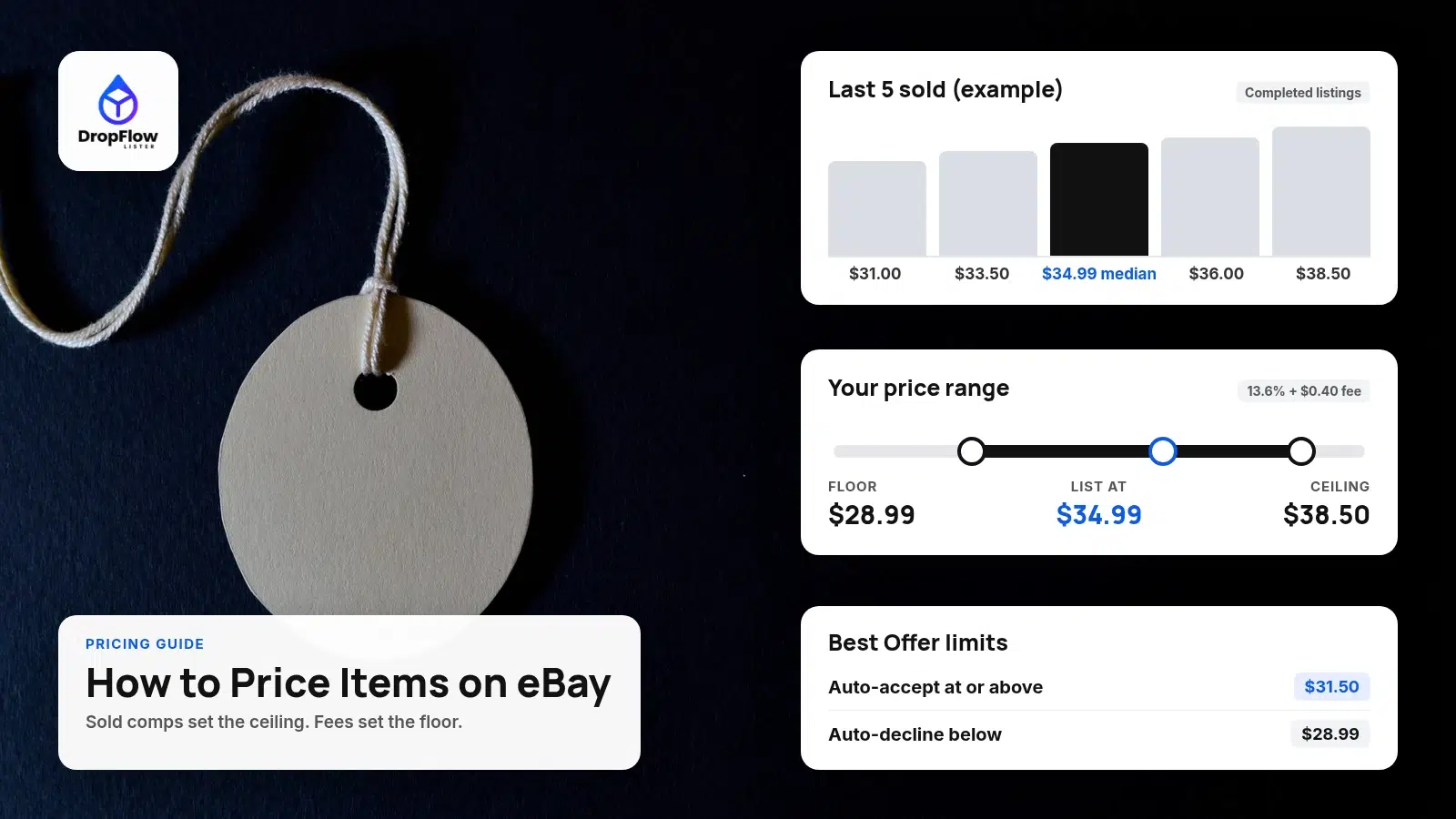
Learning how to price items on eBay comes down to two numbers: what buyers recently paid for the same item, and the lowest price that still pays you after fees. This guide is for eBay sellers and dropshippers who want a repeatable method instead of a guess.
You’ll set a ceiling from sold listings and a floor from eBay’s fees, then price between the two. Every eBay rule below was checked on eBay’s help pages on October 26, 2026.
- Ceiling: the median of recent sold prices for the same item and condition.
- Floor: your cost plus eBay’s final value fee (13.6% plus $0.40 per order in most categories) plus the profit you want.
- Format: fixed price for items you can restock, auctions for one-off items with unclear value.
- Offers: set auto-decline at your floor and auto-accept a little below your list price.
What does pricing an item on eBay mean?
It means choosing a price, format and offer settings that buyers accept and that still leave profit after eBay’s fees.
How Do You Price Items on eBay?
Quick answer: Find sold comps, take the median as your ceiling, calculate a fee-based floor, then list between the two with Best Offer limits.
Here’s how to price items on eBay in five steps, for resold or dropshipped items.
1Step 1: Find sold comps
Search for the exact item and filter to sold listings. Match the brand, model, size and condition, because a new item and a used one sell in different ranges.
2Step 2: Set your ceiling from the median
Write down 5 to 10 recent sold prices, including shipping, and take the middle value. The median ignores one-off highs and lows.
3Step 3: Calculate your floor with fees
Add your item cost, your shipping cost, eBay’s fees and the minimum profit you’ll accept. The free eBay fees calculator does this math for you.
4Step 4: Pick a format and a price
For most items, list at fixed price near the median. If the floor sits above the median, find a cheaper source for that item.
5Step 5: Set Best Offer limits
Turn on Best Offer and use your floor as the auto-decline amount. That way, every offer eBay accepts for you is still profitable.
Where Do You Find What Items Actually Sold For on eBay?
Quick answer: Use completed listings for the last 90 days, or Product research in Seller Hub for up to 3 years of sales data.
eBay’s Pricing your items help page suggests looking at similar listings first. To see what items like yours sold for, go to Advanced Search, enter your keywords, select Completed listings and search. For a full walkthrough, read how to see sold items on eBay.
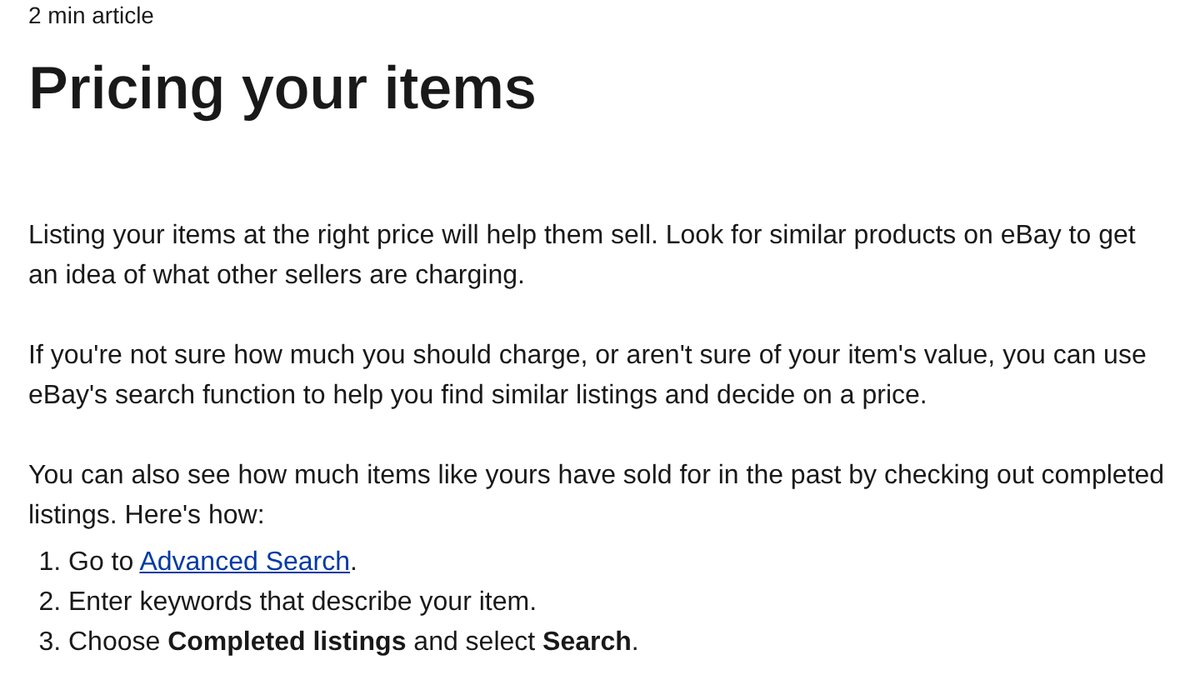
Source: eBay help, Pricing your items, captured October 26, 2026.
For deeper data, open the Research tab in Seller Hub. eBay’s Product research page says it covers the last 3 years of sales. It shows average sold price, sold price range, average shipping, sell-through rate and the number of sellers.
- Completed listings only include listings that ended in the previous 90 days.
- Product research shows the actual sold price, even when the seller accepted a Best Offer.
- Filters for condition, dates and UPC or MPN help you remove mismatched comps.
That Best Offer detail matters, because a listing may have sold below its listed price. To find items worth pricing in the first place, see our guide on how to find winning dropshipping products.
How Do eBay Fees Change the Price You Should Set?
Quick answer: eBay takes a percentage of the total sale plus a per-order fee, so your floor has to cover both before any profit counts.
According to eBay’s selling fees page, most sellers pay two fees: an insertion fee and a final value fee. You get 250 zero insertion fee listings a month, then $0.35 per listing in most categories.
The final value fee is a percentage of the total amount of the sale plus a per-order fee. That total includes the item price, shipping you charge and sales tax. For most categories, the rate is 13.6% on up to $7,500, and the per-order fee is $0.40 on orders over $10 ($0.30 at $10 or less).
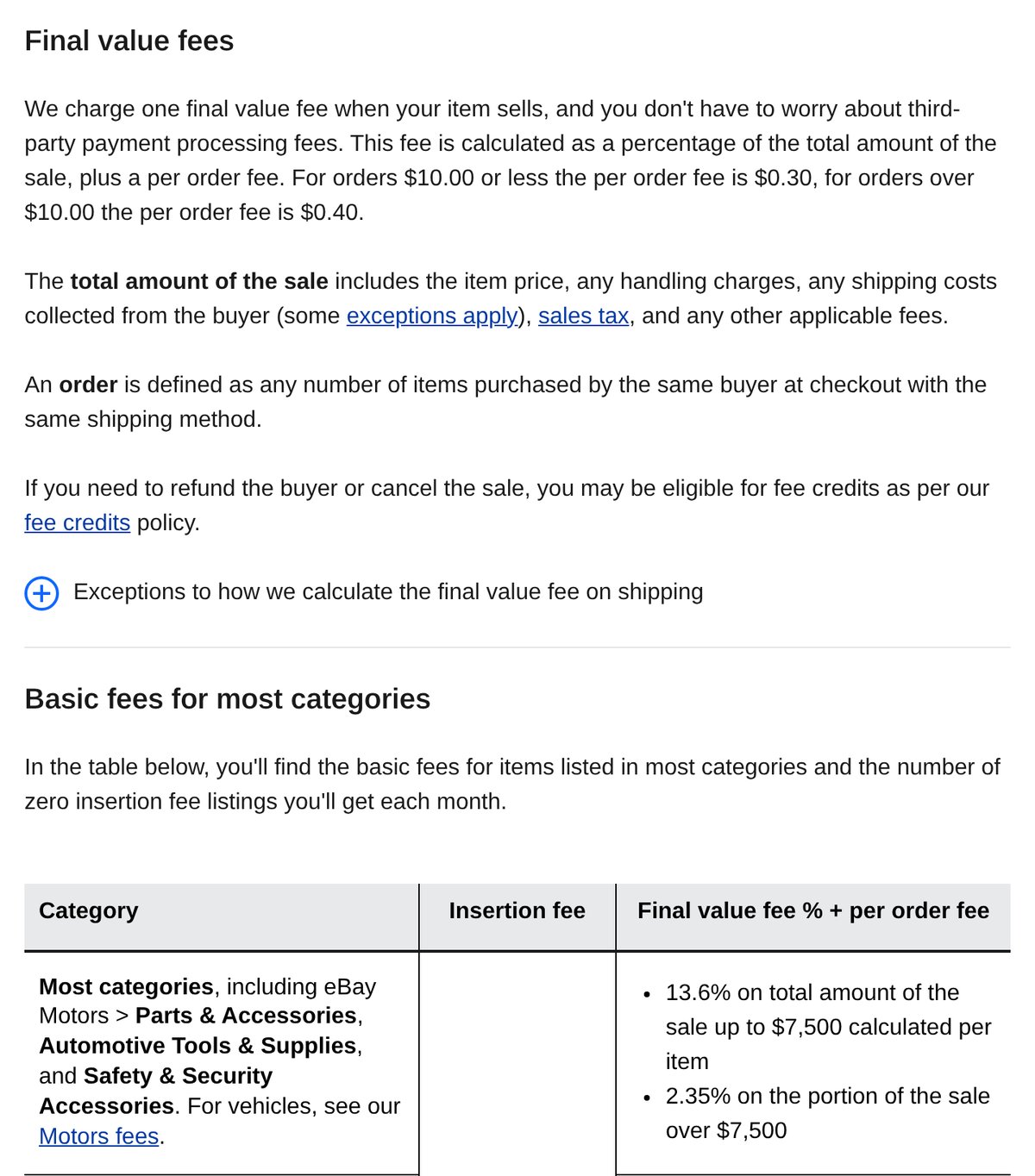
Source: eBay help, Selling fees, captured October 26, 2026.
Price floor = (item cost + shipping cost + per-order fee + minimum profit) ÷ (1 − fee rate × (1 + sales tax rate))
Some categories use a different rate, such as 15.3% for books, movies and music. If you run ads, add the ad rate too, as our guide to whether eBay promoted listings are worth it explains.
Worked example: pricing a dropshipped item
Say your supplier cost is $18, including delivery to the buyer, and you offer free shipping. Your recent sold comps are $31.00, $33.50, $34.99, $36.00 and $38.50, so the median is $34.99.
| Price point | Sale price | eBay fee | Profit |
|---|---|---|---|
| Break-even | $21.50 | $3.50 | $0.00 |
| Floor (auto-decline below) | $28.99 | $4.58 | $6.41 |
| Auto-accept offers at | $31.50 | $4.94 | $8.56 |
| List price (median) | $34.99 | $5.44 | $11.55 |
Example, our calculation: 13.6% final value fee on the sale plus an example 6% sales tax, plus the $0.40 per-order fee, using rates from eBay help id=4822, checked October 26, 2026. No ads or store discounts.
That’s how to price items on eBay with real numbers. In this example, the item has about $13 of room between break-even and the median. That’s a healthy spread, and it lines up with the targets in our eBay dropshipping profit margins guide.
Should You Use Buy It Now or an Auction?
Quick answer: Use Buy It Now for items with clear comps or stock you can replace. Use an auction when an item is rare and comps are thin.
eBay’s Buy It Now help page says fixed-price listings are Good ‘Til Canceled by default and renew every month. A fixed-price item has to be priced at $0.99 or higher.
Auctions run for 1, 3, 5, 7 or 10 days, according to eBay’s auction help page. A low starting price draws bidders, and some categories let you set a reserve price. If you add Buy It Now to an auction, it must be at least 30% higher than the starting price in most categories.
For dropshipping, fixed price wins almost every time, since one listing can sell again and again.
How Should You Set Best Offer Limits?
Quick answer: Auto-decline below your floor, auto-accept a bit under your list price, and handle anything in between yourself.
eBay’s Best Offer help page lets you turn on offers in the Pricing section of your listing. With automatic responses, offers at or above your upper limit are accepted, and offers below your lower limit are declined. The upper limit has to be lower than your Buy It Now price.
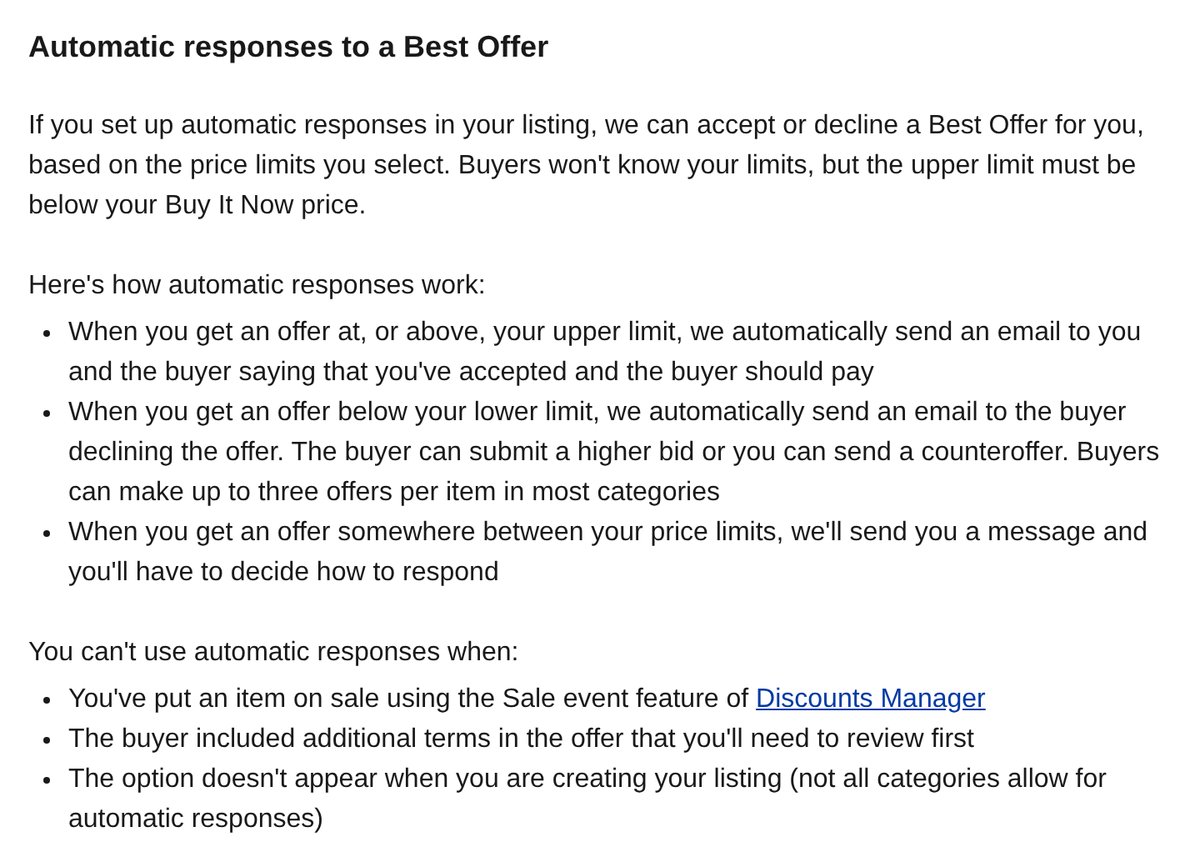
Source: eBay help, Adding Best Offer to your listing, captured October 26, 2026.
- Timing: you have 24 hours to respond, and buyers can make up to 3 offers per item in most categories.
- Send offers: you can send offers to watchers, at least 5% below your Buy It Now price.
- Ads: if a buyer clicked your promoted listing within 30 days, the general ad fee also applies to the accepted offer.
In the worked example, that means auto-decline below $28.99 and auto-accept at $31.50. Every automatic yes keeps at least $8.56 of profit.
When Should You Change Your eBay Price?
Quick answer: Change it when sold comps move, when your cost changes, or when a listing gets views but no sales.
To lower or raise a price, go to Seller Hub or My eBay and choose Revise on the listing. eBay’s pricing page also offers an Auto price reduction option in the quick listing tool. It lowers the price by a set amount every 3 days, down to a minimum you choose, so set that minimum at your floor.
The advanced and bulk listing tools also have a Your cost field, so eBay shows your cost when you review offers.
For dropshippers, supplier prices are the main trigger, because your floor moves with them. Our eBay price tracking guide shows how to keep listings in step automatically, and our eBay out of stock option guide covers what to do when stock runs out.
What Pricing Mistakes Cost eBay Sellers Money?
Most pricing errors come from skipping one side of the range. When you learn how to price items on eBay, watch for these:
- Pricing from active listings. Asking prices aren’t sales, so use sold data.
- Forgetting the fee on shipping and tax. eBay charges its fee on the total sale.
- Mixing conditions. New and used comps sit in different price bands.
- Static prices on moving costs. If your supplier’s price rises and yours doesn’t, your margin shrinks.
How Does DropFlowLister Help You Price Items on eBay?
DropFlowLister is AI listing and dropshipping automation software, currently on eBay and Poshmark, with more marketplaces coming. It turns this method into rules for every listing.
- Markup rules at import. Flow Lister applies your markup to every imported product and writes AI titles, with access to 500M+ products.
- Automatic price and stock tracking. Flow Tracker checks Amazon, AliExpress and Walmart products continuously and updates your eBay prices from your markup.
- Price guards. The Flow Tracker for eBay help guide lists Markup %, markup by supplier, Variable Pricing by Range, price endings such as .99, and a Max Price Drop % that blocks big cuts.
- Clean books. Auto Order and Bookkeeping keeps your eBay and Poshmark sales and costs in one place, and automated buyer messages keep buyers updated.
Plans start at $39 a month for eBay, and every plan includes Flow Tracker. See DropFlowLister pricing for details.
New to selling? Start with our step-by-step guide to dropshipping on eBay.
Frequently Asked Questions
What is the best way to price items on eBay?
Base your price on recent sold listings for the same item and condition, then check it against fees. The median sold price makes a strong list price. Before you publish, confirm it clears your cost, eBay’s final value fee and your minimum profit.
How do I see what an item sold for on eBay?
Go to Advanced Search, enter your item’s keywords and select Completed listings. That covers the last 90 days. For up to 3 years of data, plus the real price on accepted offers, use Product research in the Seller Hub Research tab.
Does eBay suggest a price for my item?
For certain items, yes, it can. eBay may show a price recommendation in the listing flow, based on similar items that sold recently on eBay. Those ranges exclude fees, so still check your floor with a fees calculator before you accept one.
How do I change the price of an item on eBay?
Open Seller Hub or My eBay, find the active listing and select Revise, then update the price and save. To lower it slowly over time, use Auto price reduction, which drops it every 3 days down to the minimum you set.
Should I include shipping in my eBay price?
Either way works, because eBay charges its final value fee on the shipping you charge too. Many sellers offer free shipping and build the cost into the item price. Just make sure your floor covers the shipping cost and the fee on it.
Price Your Next Listing With Real Numbers
Sold comps give you the ceiling, fees give you the floor, and Best Offer limits keep every sale between the two. Run your next item through the eBay profit calculator, then compare the result with the targets in our profit margins pillar.
Start your 14-day DropFlowLister trial for $1 and let Flow Tracker keep your prices in line with your markup rules automatically.


