

- Limits. Up to 2% of transactions with defects is allowed, and Below Standard needs defects from more than 4 buyers.
- Window. eBay checks on the 20th of each month and looks back 3 or 12 months.
- Removal. Out-of-stock cancellations aren’t on eBay’s removal list, so prevention matters most.
- Automation. Stock tracking stops buyers from ordering items your supplier no longer has.
What Counts as an eBay Defect?
Quick answer: Two events create a transaction defect: a seller cancellation, such as an out-of-stock order, and a case closed without seller resolution.
eBay’s seller standards policy defines both triggers. The first is cancelling an order unexpectedly, for example because the item was out of stock. The second is when a buyer reports an issue, you don’t resolve it, and eBay finds you responsible. That second trigger counts twice. Unresolved cases are tracked as their own metric, and eBay’s seller performance guide adds that a case closed without seller resolution “also counts as a transaction defect.”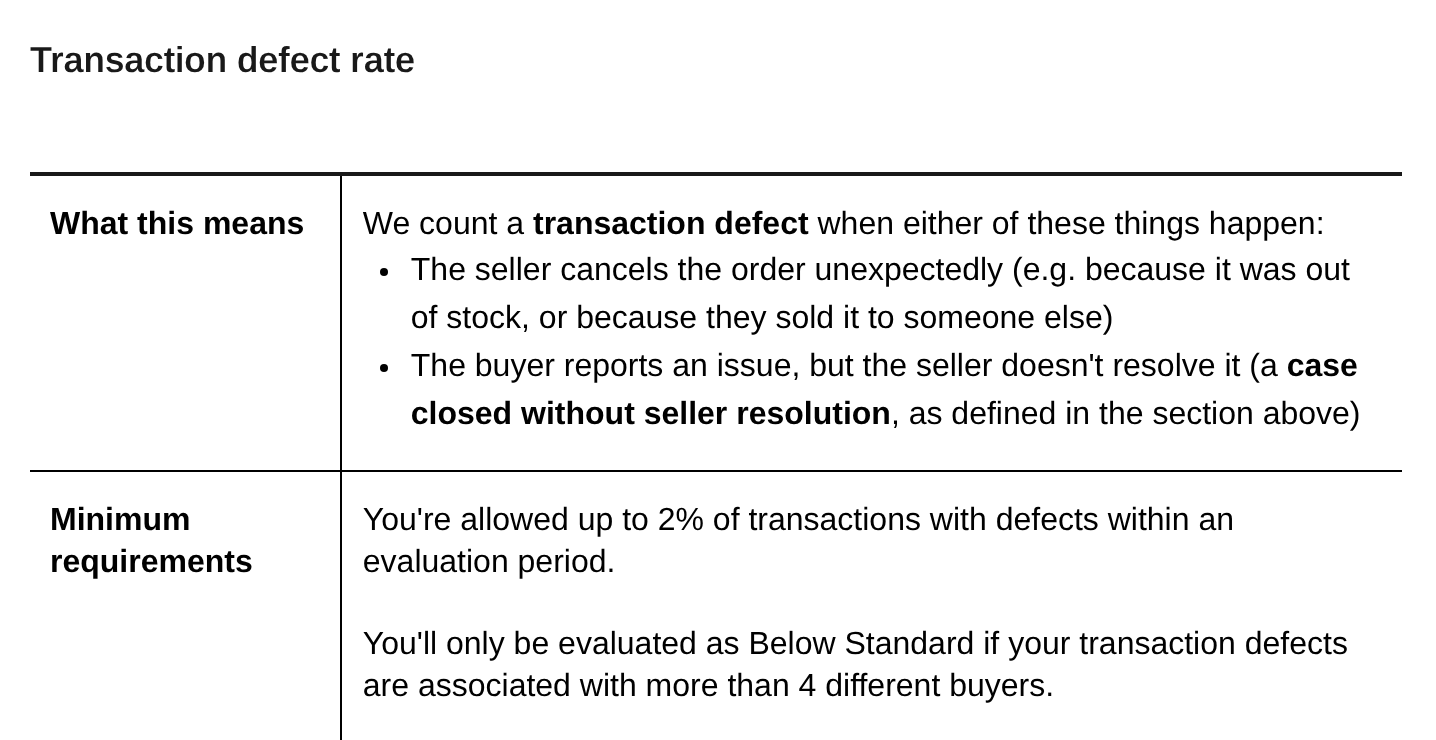
Source: eBay Seller standards policy, screenshot taken October 19, 2026.
What doesn’t count toward eBay defects?
- Late shipments. They feed a separate late shipment rate. That rate matters for Top Rated, but on its own it won’t make you Below Standard.
- Unpaid orders. eBay counts only paid transactions, and it removes the defect if you cancel for non-payment (eBay seller protections).
- Protected cancellations. eBay also removes the defect when a retracted bid disrupts your auction, or when a buyer demands something your listing didn’t offer.
- Abusive buyers. Defects linked to a buyer who broke eBay’s abusive buyer policy are removed automatically.
What Are the Limits for eBay Defects in 2026?
Quick answer: To stay Above Standard, keep your transaction defect rate at or under 2% and cases closed without seller resolution at 2 or fewer (or 0.3%). Top Rated needs 0.5% or less.
| Metric | Minimum (Above Standard) | Top Rated |
|---|---|---|
| Transaction defect rate | Up to 2%; Below Standard only if defects involve more than 4 buyers | No more than 0.5%, from no more than 3 buyers |
| Cases closed without seller resolution | No more than 2 (or 0.3%), whichever is higher | No more than 2 (or 0.3%) |
| Late shipment rate | No minimum | No more than 5 (or 3%) |
| Tracking within handling time | No minimum | At least 95%, validated by carrier |
Source: eBay Seller standards policy (eBay.com), checked October 19, 2026. Other eBay sites and international sales can use different thresholds.
In other words, 2% keeps you selling normally, while 0.5% protects the Top Rated badge. Our guide to eBay seller levels explains all three levels. Meanwhile, the eBay Top Rated seller requirements guide covers the extra sales and tracking rules. Also note that since October 15, 2026, eBay Live transactions no longer count in seller standards or service metrics.How Does eBay Calculate Your Transaction Defect Rate?
Quick answer: On the 20th of every month, eBay divides your transactions with a defect by all transactions in your evaluation period.
Transaction defect rate = transactions with a defect ÷ all transactions in your evaluation period
The evaluation period depends on your volume. If you had more than 400 transactions in the past 3 months, eBay counts those 3 months. Otherwise, it looks back over 12 months (eBay seller standards policy). eBay’s own examples show how this plays out. One small business had 1,000 transactions in 3 months, with 4 out-of-stock cancellations and 3 unresolved cases. That’s 7 defects, or 0.7%, so the seller stayed Above Standard. By contrast, a bike-parts seller cancelled 25 of 1,000 orders for 25 different buyers, and that 2.5% rate meant Below Standard. However, a store with the same 2.5% from only 2 buyers stayed Above Standard.What Happens If Your eBay Defect Rate Is Too High?
Quick answer: eBay rates you Below Standard at the next evaluation, which affects search placement, selling limits, payouts and fees.
Some limits start right after the evaluation, according to eBay’s seller standards policy:- Search. Your items may be placed lower in Best Match results.
- Limits. Your selling limits may decrease.
- Ads. You’re blocked from Promoted Listings, including edits to existing campaigns.
- Funds. Payouts may be held until tracking shows the item is on its way.
- Returns. You can’t deduct from a refund when an item comes back used or damaged.
What Causes eBay Defects When You Dropship?
Quick answer: For dropshippers, eBay defects usually start upstream: supplier stock, supplier prices, or shipping speed.
Supplier stock-outs
Your listing stays live after the supplier sells out, so a buyer orders and you cancel. That defect isn’t covered by eBay’s removal criteria. Our guide to eBay out of stock cancellations covers the fixes.Supplier price changes
Your supplier raises the price, but your listing doesn’t move. As a result, you either sell at a loss or cancel. Cancelling to avoid the loss creates the same defect as a stock-out.Slow or untracked shipping
A late or untracked parcel invites “item not received” requests. If one escalates and eBay rules against you, it becomes a case closed without seller resolution, which is also a defect.How Do You Avoid eBay Defects at Scale?
Quick answer: Prevent eBay defects by removing the three causes with a repeatable system: synced stock, current prices, honest handling times, tracking on every order, and fast buyer support.
1Step 1: Sync stock with every supplier
Set a listing to quantity 0 (with the eBay out of stock option turned on), or end it, as soon as the supplier sells out. eBay itself warns that cancelling because you can’t send the item creates a defect, so keep quantities in sync (eBay seller performance guide).2Step 2: Reprice when supplier costs move
Recalculate each price from the supplier’s current cost and your markup, so you never cancel just to avoid a loss. Our guide to eBay price tracking covers the setup.3Step 3: Set a handling time you can meet
Handling time runs in business days, from payment to the first carrier scan. eBay recommends no more than 2 days, but only promise what you can reliably hit (eBay delivery date options). For supplier-shipped orders, base it on the supplier’s real dispatch time, as our eBay late shipment rate guide shows.4Step 4: Add tracking inside your handling time
Upload valid tracking for every order. When tracking shows an on-time scan, eBay won’t count a late shipment. Tracking that shows on-time shipping and delivery also protects you in “item not received” cases (eBay seller protections).5Step 5: Resolve buyer requests before eBay steps in
Answer return and “item not received” requests quickly, and offer a refund or replacement when it’s fair. Once eBay closes a case against you, you can only appeal the case within 30 days. Finally, review your Seller standards dashboard every week. eBay’s Transaction Defect Report syncs with it daily and shows the date any defect was removed (eBay Seller Center).Can You Remove eBay Defects?
Quick answer: Sometimes. eBay removes some defects automatically within 72 hours, and you can request a review within 90 days, but only for specific reasons.
eBay automatically removes defects and late shipments after widespread weather events, eBay site issues, or late deliveries that tracking shows you shipped on time. Most automatic removals finish within 72 hours (eBay appeal a defect). If a defect isn’t removed, you can ask for a review within 90 days of the transaction. In Seller Help, select Request assistance, then Appeal a defect, and choose the item.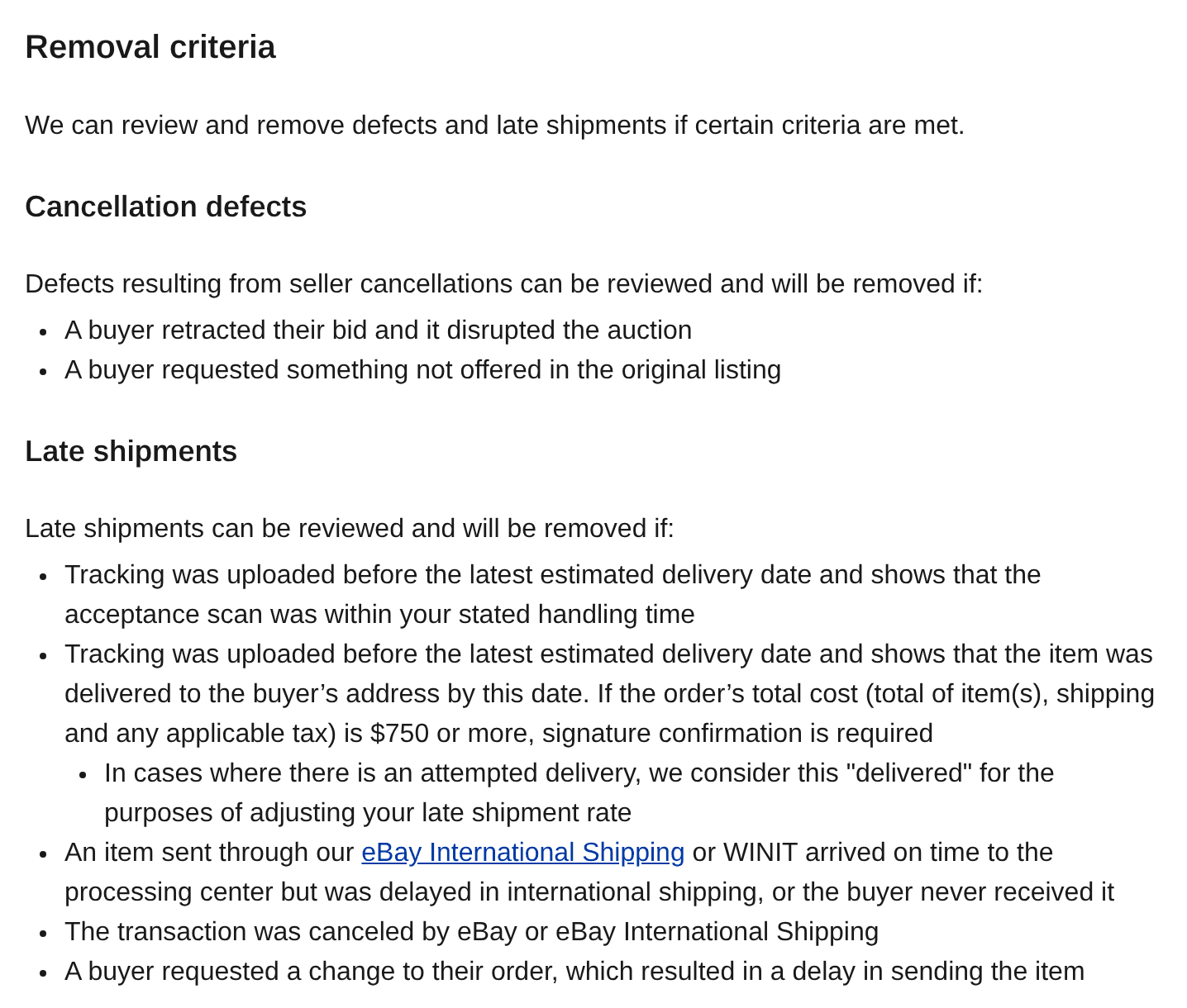
Source: eBay Appeal a defect or late shipment, screenshot taken October 19, 2026.
As the screenshot shows, cancellation defects qualify only when a buyer retracted a bid or asked for something not in your listing. Out-of-stock cancellations aren’t on that list. That’s why prevention beats appeals for dropshippers.How Long Do eBay Defects Stay on Your Account?
Quick answer: eBay defects count while the transaction sits inside your evaluation period: 3 months with 400+ transactions in that time, otherwise 12 months.
There’s no manual reset. Each month on the 20th, eBay recalculates the window, so older transactions and their eBay defects drop out as new sales come in. If a removal puts you back above the minimum, eBay adjusts your level at the next evaluation. So steady volume helps: a store on a 3-month window clears an old defect sooner.How Do You Avoid Late Shipment Defects When You Ship Orders Yourself?
Quick answer: Get a carrier scan inside your handling time and upload tracking. That protects you even if delivery runs late.
With tracking, eBay counts a late shipment only when the delivery scan is after the latest estimated date and there was no carrier scan within your handling time (eBay seller standards policy). So the scan date is what matters most.- Ship by the cut-off. 1-day handling means a scan by the end of the next business day, not within 24 hours.
- Use same-day cut-offs. If you offer same-day handling, set your cut-off times in Shipping Preferences (eBay delivery date options).
- Plan time off. Turn on Time Away before a break, which eBay suggests to avoid late shipments.
- Track every parcel. Without tracking, eBay asks buyers who leave feedback whether the item arrived on time.
How Does DropFlowLister Help You Avoid eBay Defects?
DropFlowLister is AI listing and dropshipping automation software, currently on eBay and Poshmark (see our guide to dropshipping on Poshmark), with more marketplaces coming. On eBay, three parts of it work directly on the causes of eBay defects.| Defect risk | What prevents it | In DropFlowLister |
|---|---|---|
| Supplier sells out | Quantity 0 before a buyer can order | Flow Tracker sets out-of-stock and low-stock items to quantity 0, or ends them |
| Supplier price rises | Reprice from current cost plus markup | Flow Tracker applies your markup and holds big price drops for review |
| Slow supplier delivery | Pause items that can’t arrive on time | Flow Tracker sets quantity 0 when delivery exceeds your threshold |
| “Where is my order?” messages | Updates before buyers ask | Automated thank-you and shipping-confirmation messages |
| Tracking | Upload within handling time | You add tracking numbers yourself in eBay |
Source: Flow Tracker for eBay help article and Auto Order & Bookkeeping page, checked October 19, 2026.
Flow Tracker reads your active eBay listings, checks each matching supplier product, and works out a new price and quantity. In Automate mode, it can download your listings report, run the scan, and upload the changes to eBay when it finishes. Listings created with Flow Lister already carry the right SKU, so new products are ready to track from day one. Meanwhile, automated buyer messages send thank-you notes and shipping confirmations without you typing each one. You still add tracking numbers yourself, so you control the step eBay checks for Top Rated. For a full walkthrough, read our Flow Tracker price and stock guide or our dropshipping automation software roundup.


