
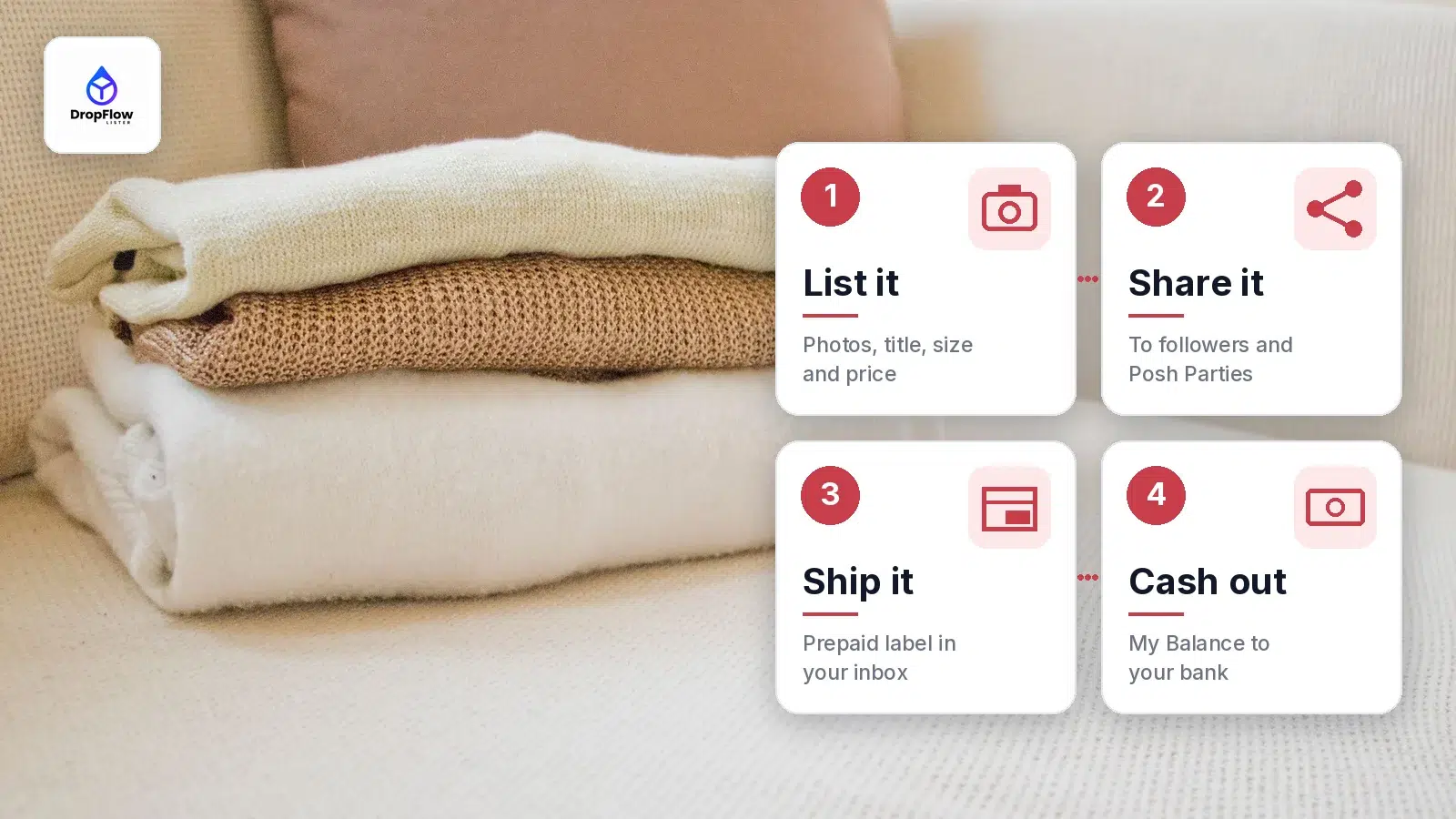
Learning how to sell on Poshmark takes about ten minutes: you list an item for free, share it, ship it with a prepaid label when it sells, and cash out your balance. This guide is for first-time sellers clearing out a closet and for resellers who want steady sales. It walks through every step, from the first listing to the first payout, with worked fee examples and practical tips. We checked each Poshmark rule and guide page quoted here on November 1, 2026.
Along the way, we point out the DropFlowLister tools that save time once your closet starts to grow.
TL;DR: How Do You Sell on Poshmark?
- List: tap Sell in the app (or click Sell on Poshmark on the web), add up to 16 photos, then a title, description, size and price.
- Share: share listings to your followers and to Posh Parties that match the item.
- Ship: when it sells, Poshmark emails a prepaid, pre-addressed USPS label. The buyer pays the $6.49 flat rate for packages up to 5 lb.
- Get paid: earnings reach your balance once the buyer accepts the item, or 3 days after delivery if they say nothing.
- Fees (US): $2.95 on sales under $15, and 20% on sales of $15 or more.
- Grow faster: DropFlowLister adds bulk listing, price tracking and order tools for Poshmark. Plans start at $19.99/mo for Poshmark and $39/mo for eBay. See DropFlowLister pricing.
How Does Selling on Poshmark Work?
Poshmark is a social marketplace for clothes, shoes, accessories, home goods and more. Its sell page sums up the process in three words: list it, share it, earn cash. It also says the community has more than 80 million Poshers.
In practice, selling on Poshmark follows four stages:
- List the item with photos, a title, a description, a size and a price.
- Share it so it shows up in your followers’ feeds and in themed Parties.
- Ship it with the prepaid label Poshmark emails you after the sale.
- Get paid once the buyer accepts the order, then move the money to your bank.
In return for its fee, Poshmark handles the payment, provides the shipping label and acts as customer support for your sale, as its Get Started guide explains. So you never have to price postage or chase a payment yourself.
How to Sell on Poshmark Step by Step
Here is how to sell on Poshmark from your first listing to your first shipped order. Each step uses Poshmark’s own guide pages.
Step 1: Set up your closet
Your closet is your shop. Download the Poshmark app or sign up on poshmark.com, then add a profile photo and a short bio so buyers know who they are buying from. Start with items you no longer wear but that are still in good shape. Poshmark’s Get Started guide suggests examples such as a dress worn once, a bedding set with tags still on, or sneakers that were always a little too small.
Next, set up the app even if you plan to list from a computer. Poshmark’s listing guide says you need to have logged in to the app recently before you can create a listing on the web.
Step 2: List an item to sell on Poshmark (app or web)
According to Poshmark’s listing guide, “Listing on Poshmark is simple and free.” In the app:
- Tap the Sell button.
- Upload or take photos of the item. You can upload several at once, up to a maximum of 16.
- Add a title, description, price and the other details.
- Tap Next, share to your friends if you like, then tap List.
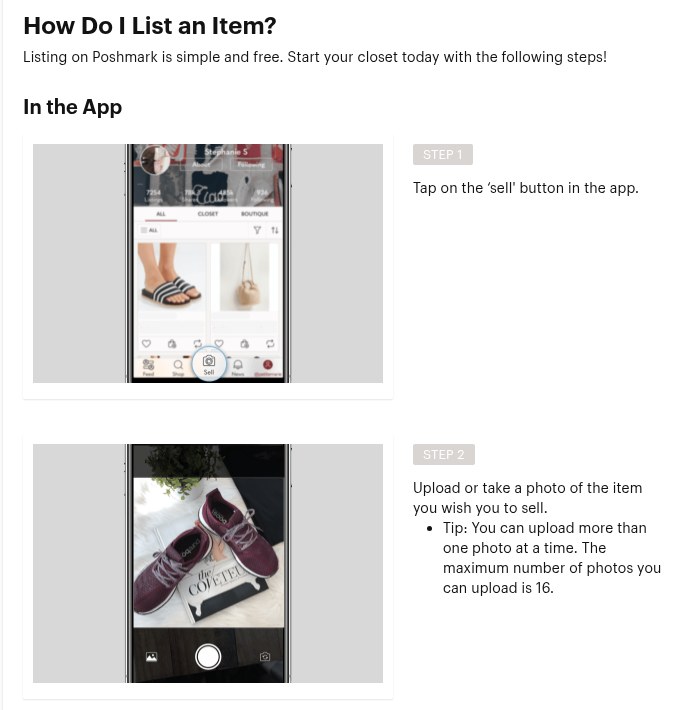
Source: Poshmark, How Do I List an Item?, captured November 1, 2026.
On the web, the flow is almost the same:
- Click Sell on Poshmark at the top right of the screen.
- Drag your photos into the box, or click Upload photos.
- Fill in the description, price, size and other fields, then select Next to list it.
Your first photo is the Covershot, the first image buyers see. As a result, it does most of the selling. Poshmark’s first-sale tips say to keep it well lit and clear, and note that styled Covershots tend to sell faster.
You can change a listing at any time. Per the edit guide, tap the listing, then the edit button at the top right in the app, or the edit icon on the web. From there you can update the Covershot, price and description, then tap Next and List.
Step 3: Write a title and description buyers search for
Buyers often search by brand, item type, size and color, so put those words in your title. For example, “Levi’s 501 Straight Jeans, Dark Wash, 32×30” beats “Cute jeans”. Then use the description to answer questions before anyone asks them.
Poshmark’s first-sale tips suggest including the condition, measurements and ideas for what to pair the item with. They also recommend photos of any wear or flaws, which builds trust and cuts down on questions. If you are not sure which items to list first, see our guide to the brands and categories that sell best on Poshmark.
Step 4: Price it with fees in mind
Before you set a price, work out what you keep. Poshmark’s Fee Policy says listing is always free, and the fee comes off the final order price after the sale. It also notes that estimated earnings show during listing creation. However, the actual amount varies with the final price, discounts and fees.
A good habit is to check recent sold prices for the same item, then set your price a little above the lowest amount you would accept. That way, you leave room for offers. To see your take-home pay at any price, use our Poshmark fee calculator.
Step 5: Share your listings to followers and Posh Parties
Sharing is what makes Poshmark social. When you share a listing, it appears in your followers’ feeds. According to Poshmark’s sharing guide, you tap Share on the listing and choose your followers. You can also share other sellers’ listings, and that goodwill often comes back to you.
To share many listings at once, tap the tool icon at the top right of your closet. Then choose Share to Followers under Bulk Listing Actions, select the items and confirm.
Posh Parties are themed shopping events. Per Poshmark’s Party guide, Poshmark hosts Parties in the app several times a day. Once a Party starts, tap Share on a listing and pick the Party name. As long as the item fits the theme, it is added to the Party. You can also bulk share from the same Seller Tools menu by choosing Share to [Party name].
Step 6: Handle offers and bundles
Buyers can make offers, and you decide whether to accept, decline or counter. Price with that in mind, and answer quickly so the buyer stays interested. To speed this up, Poshmark’s Smart Sell is an optional setting for each listing. You set a minimum price, and it accepts or negotiates offers for you without going below it.
Bundles let a buyer combine several items from your closet into one order and one shipping label. As Poshmark’s bundle guide explains, the buyer taps Add to Bundle, then buys the bundle or makes an offer on it. Sellers can also set a bundle discount under Account Tab, My Seller Tools, My Seller Discount. Poshmark then applies the discount on its own when someone buys a bundle from you.
Step 7: Ship what you sell on Poshmark with the prepaid label
When an item sells, Poshmark’s shipping guide says the sale confirmation email includes a prepaid, pre-addressed label. Poshmark’s Shipping Policy asks sellers to ship within 7 days of the purchase date, as shown by a carrier scan. Here is how to ship it:
- Pack the item in your own box or mailer. Don’t use USPS Priority Mail packaging, or USPS charges a $5 fee.
- Print the label and attach it. If you don’t have a printer, show the Shipping QR code at a USPS location instead.
- Drop the package off at USPS, or schedule a free USPS pickup.
Need boxes? Sellers can request free USPS Ground Advantage packaging. Note that items with lithium batteries have extra shipping requirements, which the guide lists. Label preferences live under Shipping Label Settings in My Seller Tools.
For heavy items, Poshmark’s February 2026 update set two upgrade tiers: $5.00 for 5.1 to 10 lb and $10.00 for 10.1 to 15 lb.
Poshmark Fees: How Much Does It Cost to Sell on Poshmark?
Poshmark keeps the fee simple. For US sales, the Fee Policy (version 1.7, current) sets two rates:
| Sale price | Poshmark fee | You keep |
|---|---|---|
| $10 | $2.95 (flat rate under $15) | $7.05 |
| $15 | $3.00 (20%) | $12.00 |
| $40 | $8.00 (20%) | $32.00 |
| $100 | $20.00 (20%) | $80.00 |
In short, sales under $15 pay a flat $2.95, and sales of $15 or more pay 20%, so you keep 80%. If you set a bundle discount or accept a lower offer, the fee applies to the final order price.
Shipping is separate. Poshmark’s Shipping and Packaging Guide says buyers pay a $6.49 flat rate for USPS Ground Advantage shipping. The label covers packages up to 5 lb, and extra items from the same seller can ship for the same fee.
To run your own numbers, including discounts, try the Poshmark fee and profit calculator.
How Do You Get Paid on Poshmark?
Getting paid is the last part of how to sell on Poshmark. Poshmark pays you through your in-app balance. The money arrives after the buyer receives the item, and then you choose how to withdraw it.
When does Poshmark pay you?
Under Poshmark’s Terms of Service, the earnings land in your account once the buyer confirms receipt and accepts the item. If the buyer does not report a problem within 3 days of delivery, based on tracking, the sale is accepted and the money is added to your balance.
So if you are looking at a Poshmark pending balance, that is the waiting window between delivery and acceptance. In other words, ship quickly, and the 3-day clock starts sooner.
How to cash out your balance
Poshmark’s How Do I Get Paid? guide lists the steps. Go to Account Tab, then My Balance, tap Redeemable and pick a transfer method:
| Method | Cost | Typical timing |
|---|---|---|
| Direct deposit to your bank | No transfer fee listed | 2 to 3 business days |
| Check by mail | No transfer fee listed | Mailed to your address |
| Debit card transfer (participating cards) | Transfer fee | Usually within 30 minutes |
| PayPal | Transfer fee | 1 to 3 business days to your bank after you withdraw from PayPal |
| Venmo | Transfer fee | 1 to 3 business days to your bank after you withdraw from Venmo |
The debit card option works with most Visa and Mastercard debit cards, but not prepaid or expired cards. Poshmark uses Hyperwallet to deliver the debit card, PayPal and Venmo transfers. You can also spend your balance on Poshmark itself, according to the Get Started guide.
Tips for Selling on Poshmark (and How to Be Successful)
These tips for selling on Poshmark come from Poshmark’s own advice and from habits that make any closet easier to buy from:
- Lead with a strong Covershot. Use natural light, a clean background and the whole item in frame.
- Use more than one photo. You have up to 16, so show the label, the fabric, the soles or the inside.
- Add measurements. Sizes vary by brand, and measurements answer the most common question before it is asked.
- Be honest about condition. Photograph any wear or flaws, as Poshmark’s first-sale tips suggest.
- Reply to comments quickly. Poshmark warns that a slow answer can cost you an interested buyer.
- Share every day. Share your listings to followers, and join Parties that match your items.
- Follow and share others. Poshmark suggests finding people with the same shoe size, following them and sharing listings you like.
- Turn on a bundle discount. It nudges buyers to add a second or third item to one shipment.
- Ship fast. The sooner the buyer has the item, the sooner the money reaches your balance.
- Refresh older listings. Update the Covershot, price or description from the edit screen when an item has been sitting for a while.
Poshmark also builds in seller tools. Its Fee Policy lists copy listing, Posh Shows livestreams, pricing tools, My Closet Insights, Bulk Actions and My Shoppers. If your closet grows past a handful of items, read our guide to listing many Poshmark items at once.
Is Selling on Poshmark Worth It?
For most people with clothes, shoes or accessories to sell, yes. Once you know how to sell on Poshmark, each new listing takes only a few minutes. Selling on Poshmark costs nothing until the item sells, because listing is free. The fee then covers payment handling, the shipping label and support for the sale. Moreover, you reach a community of more than 80 million Poshers without building a website or buying ads.
It suits a few kinds of sellers best:
- Closet clean-outs: people who want to turn unworn items into cash with little setup.
- Resellers: thrift and outlet flippers who list in fashion, shoes, accessories and home.
- Small brands and boutiques: sellers who want a social storefront with shipping already solved.
The 20% fee on sales of $15 or more is the trade-off for that convenience. Because the fee is a percentage, it is easy to plan for: price each item so the 80% you keep covers your cost and your time. Then let sharing, offers and bundles do the rest.
How to Sell on Poshmark: FAQ
Is it easy to sell on Poshmark?
Yes. You list from the app or website for free, Poshmark emails a prepaid label when the item sells, and you cash out from My Balance.
How does it work when you sell on Poshmark?
You list an item, share it, and ship it with Poshmark’s prepaid label after the sale. Then the earnings reach your balance once the buyer accepts the order.
When does Poshmark pay you?
After the buyer accepts the item, or 3 days after delivery if they do not report a problem. Direct deposit then typically takes 2 to 3 business days.
What is a Poshmark pending balance?
It is money from a sale that has not reached your Redeemable balance yet, because the buyer has not accepted the order and the 3-day window after delivery is still open.
Does it cost anything to sell on Poshmark?
No. Poshmark says listing is always free. It takes its fee only after the item sells.
Who pays shipping when you sell on Poshmark?
The buyer. Poshmark’s standard label is a $6.49 flat rate for packages up to 5 lb. Sellers pay only for an upgraded label on heavier packages.
Can I edit a Poshmark listing after it is live?
Yes. Open the listing, tap edit, change the photos, price or description, then tap Next and List.
Can you dropship on Poshmark?
Yes. You can list Amazon products in your closet and order from Amazon when an item sells. Our guide to dropshipping on Poshmark walks through it step by step, and DropFlowLister’s Poshmark tools handle listing, price and stock monitoring and orders.
Ready to Sell on Poshmark at Scale With Dropshipping?
Once you know the basics, the main limit on how to make money on Poshmark is how many items you can list and ship. Dropshipping removes the inventory step. You list products from a supplier, and when one sells, you buy it from the supplier and send it to the buyer. Our full guide on how to dropship on Poshmark covers the whole process.
What DropFlowLister automates on Poshmark
DropFlowLister is multi-platform dropshipping automation software for eBay and Poshmark, with access to 500M+ products. On Poshmark, it covers each step of this guide:
- Listing: Flow Lister for Poshmark takes Amazon links or ASINs and fills in the title, description, category, colors, sizes, images, price, condition, SKU and discounted shipping. Amazon.com products list to poshmark.com, and Amazon.ca products list to poshmark.ca. Editable AI prompts shape the titles and descriptions.
- Price and stock: Flow Tracker for Poshmark checks each listing against its Amazon product, with an optional continuous mode. If Amazon runs out, the listing is set to Not For Sale, and it goes back to For Sale when stock returns.
- Offers: Check Offers collects your Poshmark offers in one dashboard with the matching Amazon price, stock and a profit comparison, so you can accept or counter every offer on Poshmark with your profit in view.
- Closet upkeep: the Closet Optimizer relists older listings that still get impressions, and can delete ones that don’t, based on rules you set.
- Orders: on the sale page, Auto Order opens the Amazon product and starts checkout. You check the address and payment and click Place Order, and the sale is saved to Bookkeeping, in its own Poshmark section. Automated buyer messages then keep your Poshmark buyer updated with thank-yous, ETAs and shipping confirmations.
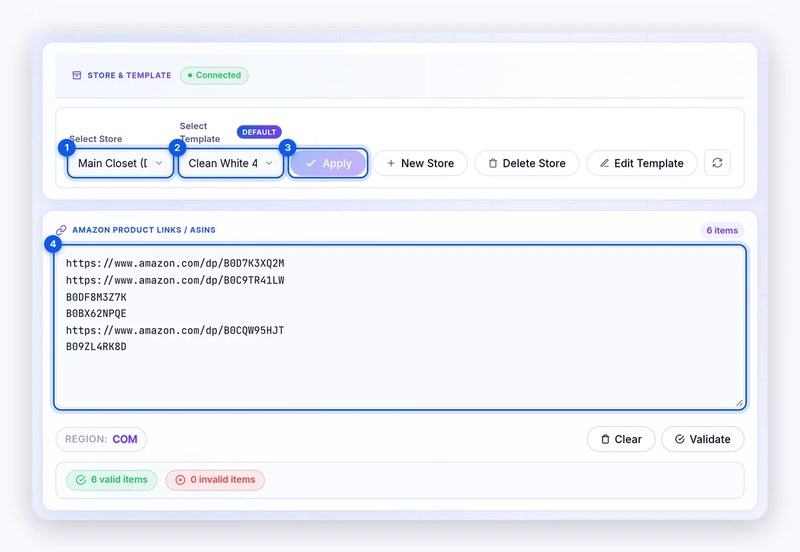
Source: DropFlowLister Help Center, Flow Lister for Poshmark, captured November 1, 2026.
See how the pieces fit together on our Poshmark dropshipping software page, and compare DropFlowLister plans; each plan covers one marketplace, and you can switch anytime. When you’re ready, try DropFlowLister 14 days for $1.


