
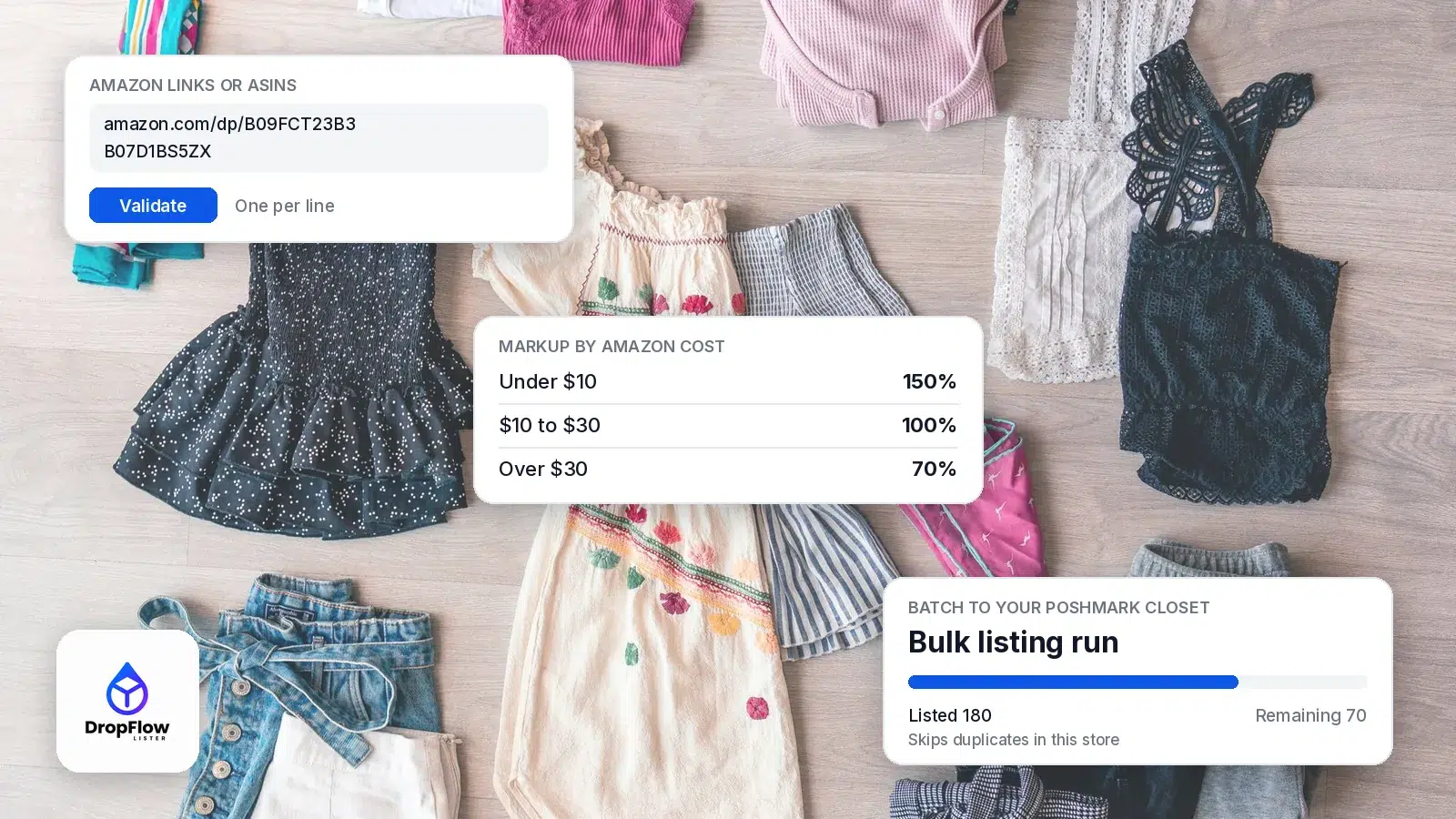
Poshmark bulk listing means creating dozens or hundreds of closet listings in one batch instead of filling out the listing form one item at a time. This guide shows a practical way to do it from an Amazon catalog. You collect product links or ASINs, set your markup and image template once, then let a single run build the listings.
We use Flow Lister, the bulk listing tool inside DropFlowLister, which works on eBay, Poshmark and more. Every feature below comes from DropFlowLister’s help center, checked on October 31, 2026. If you’re new to selling Amazon products on Poshmark, start with our complete guide to Poshmark dropshipping, then come back here to scale the listing step. To see the full feature set, here’s how DropFlowLister helps you bulk list Amazon products to Poshmark.
TL;DR: How Does Poshmark Bulk Listing Work?
In short, a batch takes seven steps:
- Collect Amazon product links or ASINs, by hand or from Amazon search pages.
- Paste and validate them, one per line. Items already listed in your store are skipped.
- Pick your Poshmark store and image template.
- Set your markup, including different markups for different cost bands.
- Run the batch and watch the progress counters.
- Schedule a daily run so new listings keep going out.
- Review the session summary and export the activity as a CSV.
DropFlowLister’s Solo plan costs $19.99 per month for 500 listings, and unused listings roll over.
What Is Poshmark Bulk Listing?
Poshmark bulk listing is any method that creates many listings at once. Most guides you’ll find online cover one of two things. Some share tips for listing items you own faster. For example, they suggest photographing everything in one session. Others cover tools that bulk edit, relist or share listings that already exist.
This guide covers a third case: creating new listings in bulk from a supplier catalog. When your products come from Amazon, the details you need already exist on the product page. So the real work is pulling those details in and pricing them with your markup. Then the photos need to fit your closet style. A bulk lister handles all three in one pass. If you still need the closet basics, see our walkthrough of listing an item and getting paid on Poshmark.
How Does Poshmark’s Own Bulk Upload Work?
Poshmark has its own spreadsheet tool. In a December 2021 post on the Poshmark blog, Poshmark introduced Bulk Upload as a web feature for Posh Ambassadors. You download a template and fill in your listing details in a CSV spreadsheet. Then you add your photos as a zip file or from an online cloud, and upload the file. In a January 2026 seller update, Poshmark added Smart Sell to Bulk Upload and made .csv the required file format.
That approach suits sellers who already keep their inventory in a spreadsheet. However, if your catalog lives on Amazon, you’d still copy every title, price and photo into the template yourself. A Chrome extension like Flow Lister skips that step, because it reads each Amazon product directly and builds the listing from it. In other words, you work from a list of links rather than a spreadsheet.
Step 1: How Do You Collect Amazon Products for a Batch?
Every batch starts with a list of Amazon products. You can paste full product links or bare ASINs, one per line, and you can mix both. There are two quick ways to build that list.
- From Amazon search pages: the ASIN Manager extracts ASINs from Amazon search results. You set Max Delivery Days and choose how many pages to extract, from 1 to 20. Then Import to Dropflow opens the Poshmark bulk lister with those ASINs loaded.
- One product at a time: while browsing an Amazon product page, Add to AI Optimizer queues that single product for your next run.
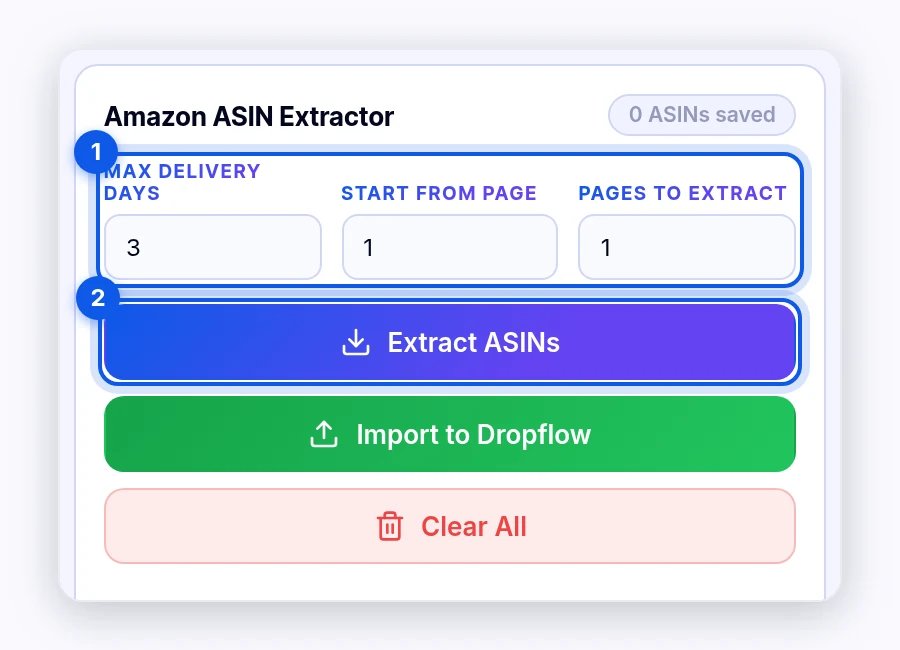
Source: DropFlowLister Help Center, ASIN Manager, captured October 31, 2026.
If you’d rather start from products that are already selling, the Product Finding Suite lets you search 500M+ products, see weekly Poshmark trends and send winners to Flow Lister in one click. Either way, aim for items Poshmark shoppers browse, such as clothing, shoes, accessories and home goods. For a seasonal starting point, see the categories Poshmark says are trending this holiday.
Step 2: How Do You Paste and Validate Your List?
Next, open Flow Lister for Poshmark in the DropFlowLister extension and paste your list into the product box. Then click Validate. The tool shows how many entries are valid and how many are invalid, so you can fix typos before the run starts.
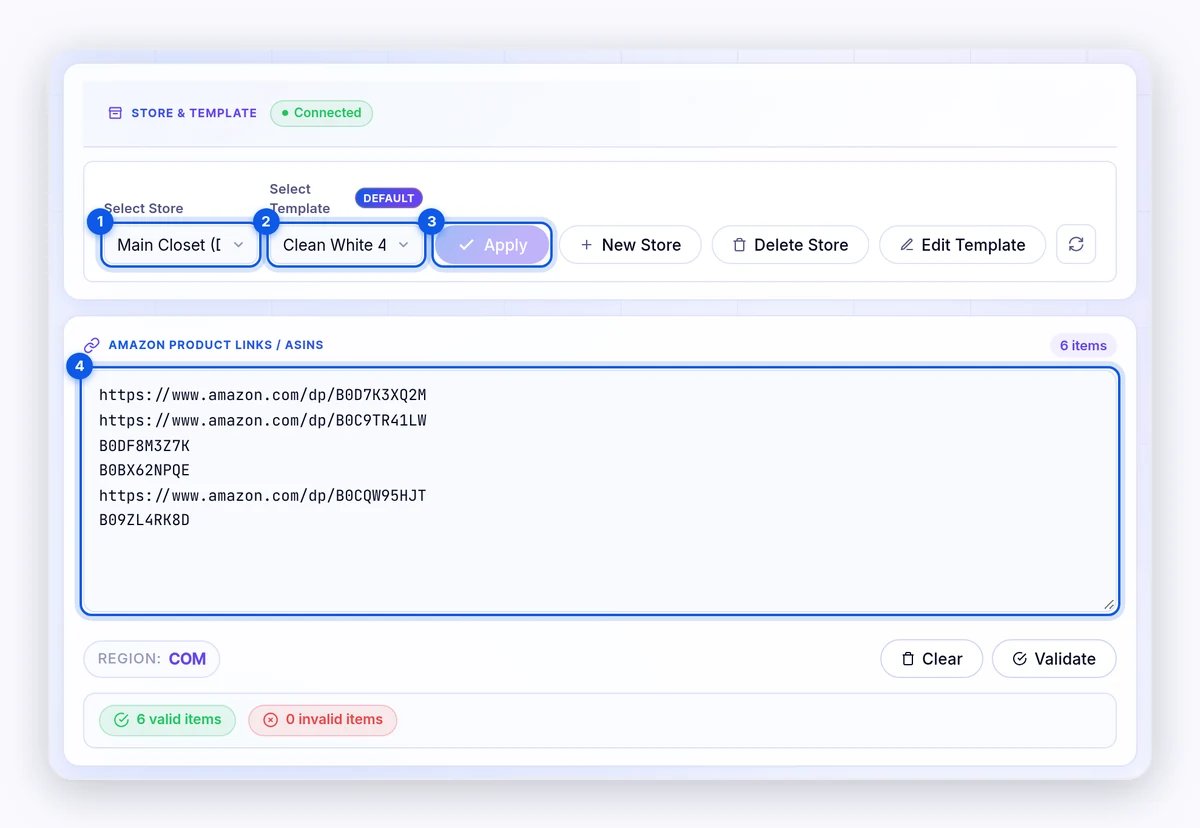
Source: DropFlowLister Help Center, Flow Lister for Poshmark guide, captured October 31, 2026.
Validation also protects you from duplicates. According to the Flow Lister for Poshmark guide, products that are already listed in the selected store appear under “Already Listed Products (Excluded)” and are skipped. As a result, you can paste a big list again next week without creating the same listing twice.
Step 3: How Do You Choose a Store and Image Template?
After validation, select your store and your image template, preview them, then click Apply. Each store is a separate profile for one closet. So duplicates are tracked per store, and your markup is saved per store too. If you run more than one closet, this keeps every batch in the right place.
Templates are what make a bulk batch look consistent. The Image Template Editor gives Poshmark its own 1080×1440 canvas, kept apart from your eBay templates. For example, you can choose a single-image layout or a grid of two, three or four images, and add text, badges, a watermark or your logo. Once you save a template, it applies to every listing in the batch.
For better photos, AI Image Enhancement can process 1 to 10 images per product and add an optional background. It runs with your own Replicate key, which Replicate bills directly. It also includes a Load Poshmark Optimized Prompt option. If enhancement fails for any product, the listing simply uses the original images.
Step 4: How Do You Set Markups for a Whole Batch?
Pricing is the setting that matters most in Poshmark bulk listing, because it applies to every item at once. Flow Lister uses a Markup Percentage, which defaults to 150. A markup of 100% doubles the Amazon price, and 200% triples it.
A single markup rarely fits a whole catalog, though. Cheap items need a bigger markup to cover Poshmark’s fee, while expensive items can sell well with a smaller one. That is why Variable Markup by Cost lets you set a different markup for each price band. Here is an example set of bands, using Poshmark’s US fee policy of 20% on sales of $15 or more. These are example numbers, not defaults, and they leave out any shipping discount you offer.
| Amazon cost | Example markup | Poshmark price | Poshmark fee (20%) | Est. profit |
|---|---|---|---|---|
| $8.00 | 150% | $20.00 | $4.00 | $8.00 |
| $20.00 | 100% | $40.00 | $8.00 | $12.00 |
| $45.00 | 70% | $76.50 | $15.30 | $16.20 |
To check your own numbers, run a few products through the Poshmark fee calculator before you set your bands. In the same panel, you can also set a Variable Shipping Discount, offer free shipping and use the Variation Filtering, Max Price Diff and Max Delivery Days filters. Sizes that Amazon doesn’t stock are set to 0, so buyers only see sizes you can actually order.
Finally, Flow Lister writes titles and descriptions with separate AI prompts for each marketplace. You can edit them in AI Prompt Configuration. For more on the writing side, see how Flow Lister’s AI writes titles and descriptions.
Step 5: How Do You Run a Poshmark Bulk Listing Batch?
Once your settings are ready, click Start Optimization. The progress panel shows Processed, Listed, Skipped, Unlisted and Remaining counts, and you can Pause, Continue or Stop at any time. Keep the tab open while the run works.
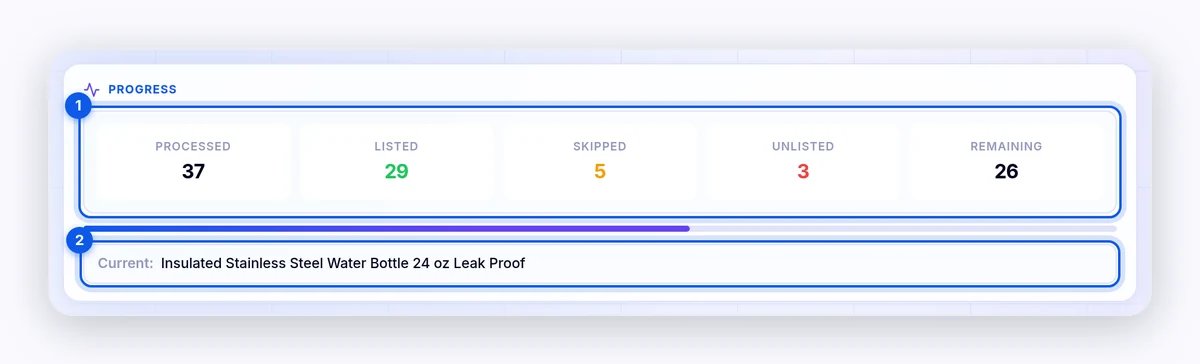
Source: DropFlowLister Help Center, Flow Lister for Poshmark guide, captured October 31, 2026.
A few settings control the pace:
- Parallel Threads: 1 to 3, with 1 as the default. The Flow Lister for Poshmark FAQ suggests starting with 1 thread and moving to 2 or 3 once runs are smooth.
- Start From and Max Successful: start partway down a long list, or stop after a set number of listings.
- Skip Keywords: skip products whose title contains words you don’t want in your closet. Load Defaults gives you a starter list.
The run also paces itself. After 100 successful listings, it takes a 2-minute cooldown every 5 listings, and a timer shows the wait. If Amazon shows a CAPTCHA, the run pauses and tries to resume on its own. Only one Flow Lister run can go at a time, so finish or stop one batch before you start the next.
Step 6: How Do You Schedule Daily Poshmark Bulk Listing?
Listing in one big burst isn’t the only option. With Auto-Scheduling, you can set a one-time run or repeat it daily at a set time, with an optional Max Listing Limit for each run. The schedule uses the links already loaded in Flow Lister. So you can paste a long list once and list a set number every day.
For a scheduled run to start, Chrome must be open and your computer awake, and Chrome notifications tell you when it runs. Poshmark and eBay schedules are separate. If a run is already going when the schedule fires, the scheduled run is skipped. Products already listed are skipped as usual.
Step 7: How Do You Review and Export a Batch?
When the batch finishes, the results area shows Recent Processed Images, a Session Summary and a Listing Activity log. You can copy the links that weren’t listed and retry them later. You can also export the activity as a CSV file named by date, which makes a handy record of what went live and when. Session data saves on its own, so closing the panel doesn’t lose your results.
What Happens After Your Listings Go Live?
Bulk listing gets products into your closet, but the closet only earns when those listings stay accurate. Because each listing comes from an Amazon product, its stock and price can change after you list it. DropFlowLister’s Flow Tracker handles that with Continuous tracking, so sold-out items switch to Not For Sale and prices follow your markup.
When an item sells, one-click Auto Order opens the Amazon product and starts checkout; you click Place Order yourself. Our Poshmark dropshipping guide covers tracking, offers and fulfillment in full. To see how those post-listing jobs fit together, see what to automate after your listings go live.
How Many Listings Does Each Plan Cover?
Every plan on the DropFlowLister pricing page includes the full feature set, and unused listings roll over. Here is what each plan works out to if you spread its listings over a 30-day month (our own math):
| Plan | Price per month | Listings | About per day |
|---|---|---|---|
| Solo | $19.99 | 500 | 16 |
| Squad | $64.99 | 4,000 | 133 |
| Agency | $125 | 10,000 | 333 |
These numbers pair well with Auto-Scheduling. For example, a Solo closet could set a daily Max Listing Limit of 16 and list steadily all month.
Poshmark Bulk Listing FAQ
Can you bulk list on Poshmark without the Bulk Upload spreadsheet?
Yes. A Chrome extension like Flow Lister builds each listing from an Amazon product link or ASIN. So you don’t need to fill in a spreadsheet template. You paste a list, set your markup and template, and start the run.
Can I list multiple items on Poshmark at once?
Yes. Flow Lister processes a whole list in one batch, with 1 to 3 parallel threads. You can also cap a run with Max Successful or schedule a daily run with a Max Listing Limit.
Will bulk listing create duplicate listings?
No. During validation, products already listed in the selected store are excluded and skipped. Scheduled runs skip already-listed products too.
What is the best Poshmark listing tool for Amazon products?
Look for a tool that reads Amazon products directly and supports markup by cost band. It should also apply a Poshmark-sized image template and keep stock in sync after listing. Flow Lister and Flow Tracker cover all four, on eBay, Poshmark and more. Selling on eBay as well? See our eBay bulk listing guide.
Does Poshmark bulk listing work in Canada?
Yes. Flow Lister lists products from amazon.com to poshmark.com and from amazon.ca to poshmark.ca, and the ASIN Manager works on both Amazon sites.
Ready to Run Your First Batch?
You now have the full workflow: collect, validate, template, price, run, schedule and review. Start with a small batch of 20 to 30 products on 1 thread, check the results, then scale up from there. If you’d like to try it on your own closet, you can try DropFlowLister 14 days for $1.


