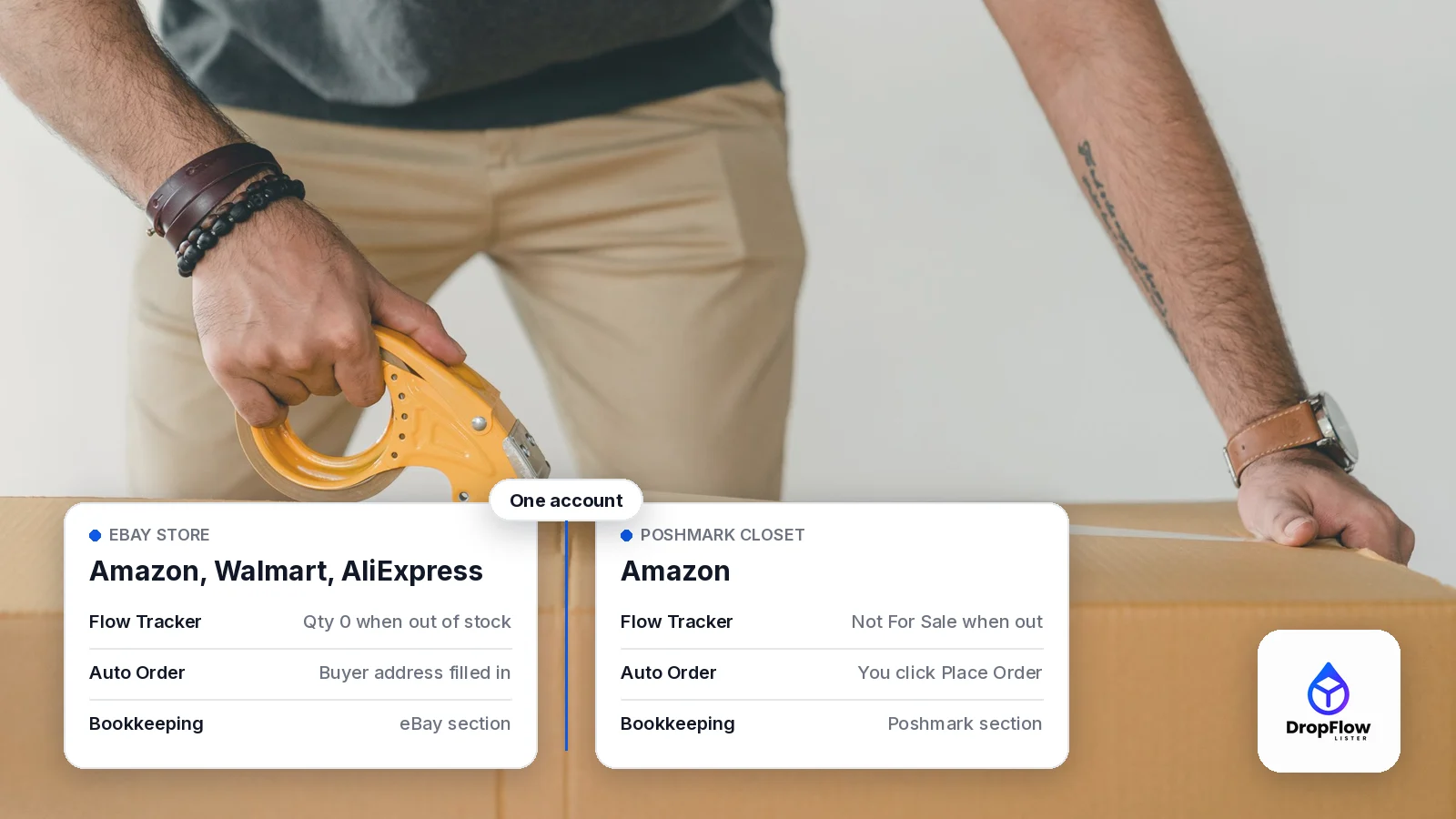
If you want to dropship on eBay and Poshmark, you don’t need a separate toolkit for each marketplace. This guide is for sellers who list supplier products and want an eBay store and a Poshmark closet running side by side from one DropFlowLister account. DropFlowLister is multi-platform dropshipping automation software, currently on eBay and Poshmark, with more marketplaces coming.
Still, each marketplace works its own way. eBay and Poshmark expect different photos and titles, and they show orders on different pages. So when you dropship on eBay and Poshmark, the goal is one account, with a setup that fits each marketplace.
Below, you’ll see how to dropship on eBay and Poshmark step by step: set up a store for each, list supplier products, keep prices and stock current, handle orders and buyer messages, and read each store’s profit. Every feature described here comes from the DropFlowLister help center and product pages, checked on November 12, 2026.
- Listing. On eBay you list Amazon, Walmart and AliExpress products. On Poshmark you list Amazon products.
- Tracking. Flow Tracker keeps price and stock in line with the supplier on both marketplaces.
- Orders. Auto Order and automated buyer messages work on eBay and Poshmark, and Bookkeeping keeps each marketplace in its own section.
- Plans. Each plan is tied to one marketplace, and you can switch anytime. On the pricing page, plans start at $19.99/mo for Poshmark and $39/mo for eBay.
Can You Dropship on eBay and Poshmark From One Account?
Yes. In DropFlowLister, a store is “a named profile for one of your selling accounts or closets,” according to the Stores guide. Stores are saved to your account, so you see the same stores on any computer you sign in on.
In practice, that means one store for your eBay account and one for your Poshmark closet. Each store keeps its own image templates and its own list of products you’ve already listed. The guide also suggests naming each one after your eBay user ID or closet name.
After that, you pick eBay or Poshmark in the extension’s marketplace dropdown, and each tool opens in the version built for that marketplace.
Which Supplier Products Can You List on Each Marketplace?
Each marketplace has its own supplier list in Flow Lister, the bulk listing tool.
- eBay. The Flow Lister for eBay guide says you can paste product links from Amazon, AliExpress and Walmart, one per line.
- Poshmark. The Flow Lister for Poshmark guide says you paste Amazon links or bare ASINs. Amazon.com products list to poshmark.com, and amazon.ca products list to poshmark.ca.
To find products for either store, the Product Finding Suite searches 500M+ products. For your closet, it also helps to start from the categories Poshmark’s own trend guides highlight.
How Do You Set Up Each Store for Its Marketplace?
Before your first run, give each store a setup that fits its marketplace. That way, every listing looks at home where it’s posted.
Build an image template for each marketplace
The Image Template Editor gives each marketplace its own canvas. Its help guide says the eBay editor uses a 1300 × 1308 px canvas and the Poshmark editor uses a 1080 × 1440 px canvas. Their templates are kept apart. On Poshmark, the first photo matters most, because Poshmark’s listing guide calls it the Covershot and compares it to “a storefront window.”
Tune the AI title and description prompts
According to the AI Prompt Configuration guide, eBay and Poshmark each have their own title and description prompts. eBay’s Seller Center says you have 80 characters for a title, so your eBay prompt should favor search words. For Poshmark titles, by contrast, the listing guide recommends “brand name, item type, color and material.”
Set a markup for each store
Fees and buyers differ, so markups should too. In the eBay Flow Lister, Default Markup % starts at 150, and you can also set a markup per supplier or by cost band. Meanwhile, the Poshmark Flow Lister saves a Markup Percentage for each store, with optional cost bands and a shipping discount setting. To check a price first, use the eBay fees calculator or the Poshmark fee calculator.
How Do You List Supplier Products to eBay and Poshmark?
Once each store is ready, a listing run takes a few clicks. These steps come from the two Flow Lister guides.
- Pick the marketplace. Click the DropFlowLister icon in Chrome, choose eBay or Poshmark, and open the Flow Lister card.
- Apply the store and template. Next, pick the store for that marketplace, pick a template, and click Apply.
- Paste your product links. Add supplier links one per line. On Poshmark, bare ASINs work too.
- Start the run. Flow Lister then reads each supplier page, can rewrite the title and description with AI, builds your images and fills in the listing form.
- Check a few listings. Finally, review the first results before you raise the batch size.
Only one Flow Lister can be open at a time, so run eBay and Poshmark one after the other. In addition, products already listed in the selected store are skipped, which keeps each store free of duplicates. For timed runs, the Auto-Scheduling guide says each marketplace has its own schedule.
For more detail, see our Flow Lister walkthrough for eBay sellers, our overview of how bulk listing works on eBay and Poshmark and the guide to running a large batch of Amazon items to your closet.
How Do You Keep Prices and Stock Current on Both Marketplaces?
Supplier prices and stock change after you list. For that reason, Flow Tracker comes in a version for each marketplace. On eBay, the Flow Tracker guide notes that tracking doesn’t count toward your plan’s monthly listings.
| Setting | Flow Tracker for eBay | Flow Tracker for Poshmark |
|---|---|---|
| Where it runs | From eBay’s active-listings report | A Product Tracker widget on your closet page |
| How it finds the product | The listing’s SKU (Custom label) | The Amazon ASIN in the SKU or description |
| Suppliers | Amazon, AliExpress and Walmart | Amazon (Amazon.com or Amazon.ca) |
| When stock runs out | Quantity set to 0, or the listing ends if you choose | Set to Not For Sale, then back to For Sale on restock |
| Price | New price from your markup, with big drops held for your check | Price follows your markup |
Source: Flow Tracker for eBay guide and Flow Tracker for Poshmark guide, checked November 12, 2026.
Tracking is continuous on both marketplaces. On eBay, the Flow Tracker page says the Simple Tracker monitors your listings “continuously in the background” when auto run is on. On Poshmark, the widget’s Continuous Tracking mode loops through your closet until you press Stop, as long as the tab stays visible. Because DropFlowLister listings already carry the right SKU, both trackers match them without extra work. Also see what eBay’s out-of-stock setting does to a listing at quantity 0. For the Poshmark side of listing, tracking, refresh, offers and orders, see what to automate in a Poshmark closet.
How Do Orders and Buyer Messages Work on eBay and Poshmark?
When a sale comes in, you order it from the supplier with Auto Order. The Auto Order and Bookkeeping page says it handles order fulfillment for sales on both eBay and Poshmark.
Auto Order on eBay
The Auto Order for eBay guide describes a DropFlow Auto Order panel on the eBay order page. One click opens the supplier product on Amazon, Walmart or AliExpress and fills in the buyer’s address. By default, you then click the final Place Order yourself.
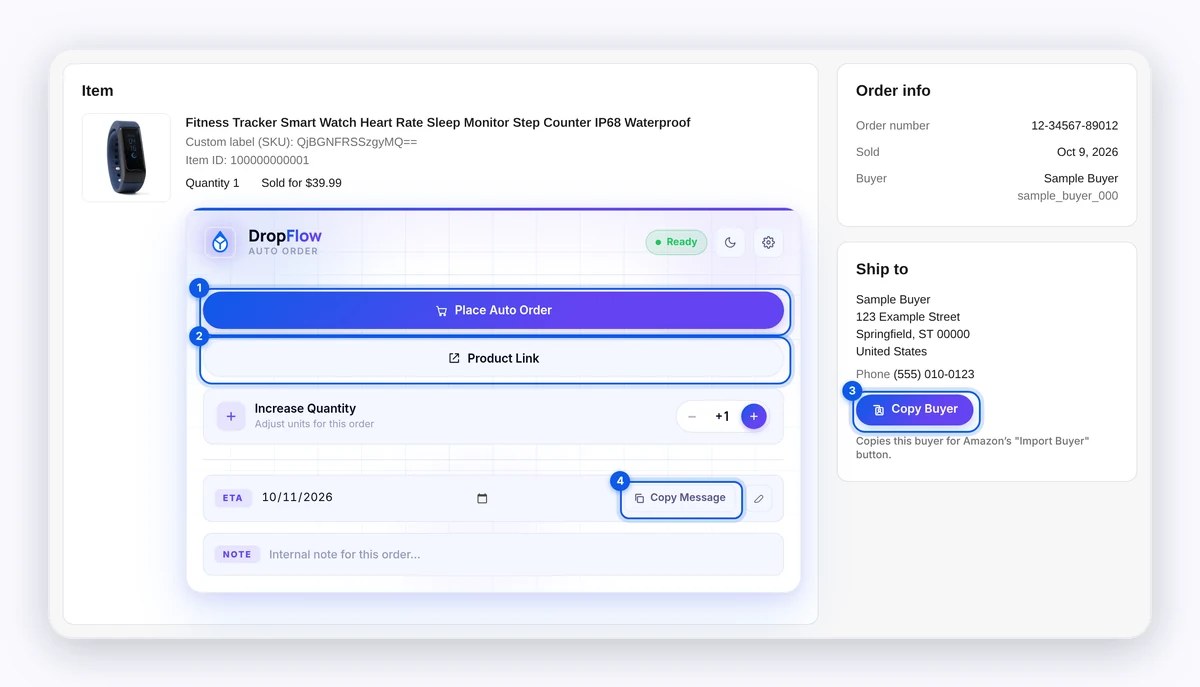
Source: DropFlowLister Help Center, Auto Order for eBay, captured November 1, 2026.
Auto Order on Poshmark
On Poshmark, the Poshmark order tools guide adds an Auto Order button to each sale page in My Sales. It opens the Amazon product and starts checkout. Then you check the shipping address, payment and item, and click Place Order.
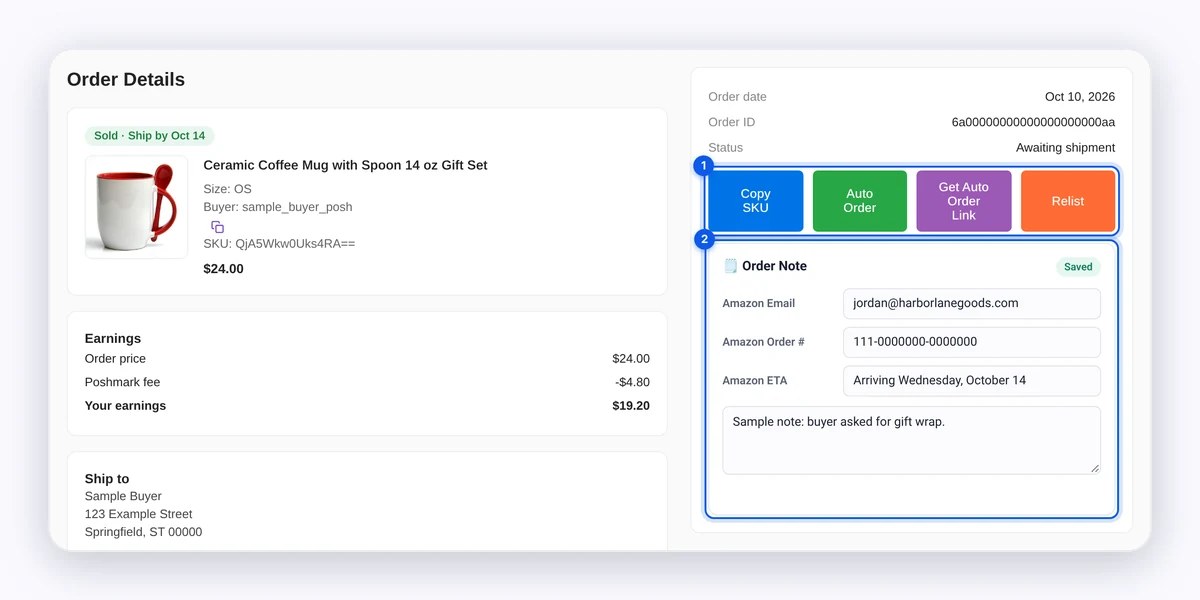
Source: DropFlowLister Help Center, Poshmark order tools, captured November 1, 2026.
Automated buyer messages on both
Buyer updates work on both marketplaces too. According to the Auto Order FAQ, DropFlowLister sends automated buyer messages for eBay and Poshmark orders. With Send ETA message (AI) on, the buyer gets an AI-written delivery message after the supplier confirms the order. You can also copy an editable template with Copy Message.
How Do You See Profit for Each Marketplace?
The Bookkeeping guide says eBay and Poshmark each have their own section.
- eBay sales are saved after an Auto Order when Auto Bookkeeping is on.
- Poshmark sales are saved after you place the Amazon order from a Poshmark sale page, with the Poshmark fee read from the sale’s earnings panel.
As a result, each saved sale shows a true profit, meaning what you earned minus what you paid the supplier. So you can compare your eBay store and your closet month by month. For the full order flow, see how Auto Order and Bookkeeping fit together.
Which DropFlowLister Plan Do You Need?
Each plan is tied to one marketplace. The pricing page tells you to “pick your marketplace and then the number of monthly listings you need,” and every plan includes every feature.
| Marketplace | Plans | Listings per month |
|---|---|---|
| eBay | Lite, Plus, Starter, Growth | 500, 1,500, 4,000, 10,000 |
| Poshmark | Solo, Squad, Agency | 500, 4,000, 10,000 |
Plans can be switched anytime. The pricing FAQ says you can upgrade, downgrade or switch between eBay and Poshmark plans from your account whenever you like, and listings you already have stay on your account. In addition, unused listings roll over while your subscription is active.
How Do You Start to Dropship on eBay and Poshmark This Week?
Start small, and set up one marketplace fully before you add the other.
- Create two stores. Name one after your eBay user ID and one after your closet.
- Build one template and one prompt per marketplace. Use the canvas sizes above.
- List a first batch on each. For instance, start with about 20 products per store.
- Turn on Flow Tracker for both. Use Continuous Tracking where it’s available.
- Review Bookkeeping after a few weeks. Then grow the store that earns more.
Frequently Asked Questions
Do I need two DropFlowLister accounts to sell on eBay and Poshmark?
No. Stores are saved to your DropFlowLister account, and each store is a profile for one selling account or closet. So you create one store for eBay and one for Poshmark, then pick the right one in Flow Lister before each run.
Can I run the eBay and Poshmark Flow Listers at the same time?
No. Only one Flow Lister can be open at a time, and opening one asks you to close the other. Instead, run them one after the other, or use Auto-Scheduling, since each marketplace has its own schedule.
Does Auto Order place Poshmark orders by itself?
Auto Order does most of the work. On a Poshmark sale page, it opens the Amazon product and starts checkout. Then you check the shipping address, payment and item, and click Place Order yourself. Afterward, the sale is saved to the Poshmark section of Bookkeeping.
Does this work for sellers in Canada?
Yes. On Poshmark, amazon.ca products list to poshmark.ca, and the Poshmark tracker supports Amazon.ca. On eBay, the Flow Tracker guide says it supports eBay US and Canada.
Ready to Run an eBay Store and a Poshmark Closet Together?
Running both comes down to one account, a store set up for each marketplace, and steady tracking after you list. If Poshmark is new to you, our step-by-step guide to selling Amazon products on Poshmark covers the closet side in depth. New to eBay instead? Start with our eBay dropshipping starter guide.
When you’re ready, try DropFlowLister 14 days for $1 and set up your first two stores.


